How to Connect Claude or ChatGPT to Instagram (and Actually Post)
Learn how to connect Claude or ChatGPT to Instagram and schedule posts from one prompt. Save ideas, plan Posts and schedule instagram content with a prompt.
Sam · · 13 min read
Connect Claude or ChatGPT to Instagram: The Complete Setup Guide
Open your Claude or ChatGPT history and scroll back a month. Count the chats that start with "give me 10 post ideas" or "rewrite this caption."
Now count how many ended with a post that's actually live on Instagram. For most people it's zero: the AI did the planning and the writing, and you did the posting, copying the caption into a scheduler, uploading the media and picking a time, every single time.
Wouldn't it be better if the same chat could post too? An Instagram MCP server lets Claude or ChatGPT plan your week from the Reels you saved, write the captions and schedule them from one prompt, with you approving before anything goes out.
This guide covers your setup options, the exact FavStash steps and what a real month of posting looks like. We build FavStash, so I'll say where another option fits better.
At a Glance#
| Question | Answer |
|---|---|
| What is an Instagram MCP? | A server that lets Claude, ChatGPT or Cursor publish, schedule and report on your Instagram account |
| Do I need a Business account? | You need a Professional account (Creator or Business). Personal accounts can't publish through any MCP server. That's an Instagram API rule |
| Can I post from Claude? | Yes. FavStash's hosted MCP server schedules or publishes Reels, images, Stories and carousels |
| Setup time | A few minutes hosted; an hour or more for a GitHub repo (our estimate) |
| Free option? | FavStash's free plan includes MCP, 1 channel and 10 scheduled posts a month |
Key Points#
- Meta doesn't publish an Instagram MCP server. Every option is built on the Instagram Graph API by a vendor or community developer
- A hosted server handles sign-in, token refresh and the schedule. A GitHub repo means creating a Meta developer app and a long-lived token first
- Scheduled posts live in FavStash's calendar, not your chat, so closing Claude doesn't cancel or break them
- Keep the approval step on. An assistant that can post can also post something wrong
- FavStash is the one option here built around a searchable stash of saved Reels, so the same chat can go from "I should try that" to a scheduled post
Who this is for#
Best for creators and social media managers who already use Claude or ChatGPT for ideas and captions, and want to publish without switching tabs to a separate scheduler.
Works if you have a Business or Creator Instagram account and you're comfortable connecting it to an AI tool through standard OAuth.
Skip if you're on a personal account you can't switch, or you only need DM automation. DM-specific servers like setsmart and inro.social cover that. This guide is about publishing and content planning.
What is an Instagram MCP server?#
MCP (Model Context Protocol) is an open standard from Anthropic that lets AI assistants call outside tools. An Instagram MCP server exposes Instagram as a set of tools: read your profile, publish a Reel, schedule a post, pull engagement numbers. You say "schedule three Reels for next week" and Claude picks the tools.
FavStash's server has 19 tools: 7 for your saved content, 4 for accounts and analytics, and 8 for planning and publishing (see the tools reference). Not every server can publish, though. Some only read profiles and hashtags, so check the tool list for a publish action first. And Meta doesn't offer its own, so you're always choosing a third party.
Business or Creator account: required#
Every publishing server goes through the Graph API, which only supports professional accounts. FavStash's docs call it "an Instagram API requirement for publishing and insights, not a FavStash choice". Switching is free: open Instagram's settings, switch to a professional account and pick Creator. You keep your followers and username. Menu names change, so follow Instagram's prompts.
The 3 ways to connect Claude to Instagram#
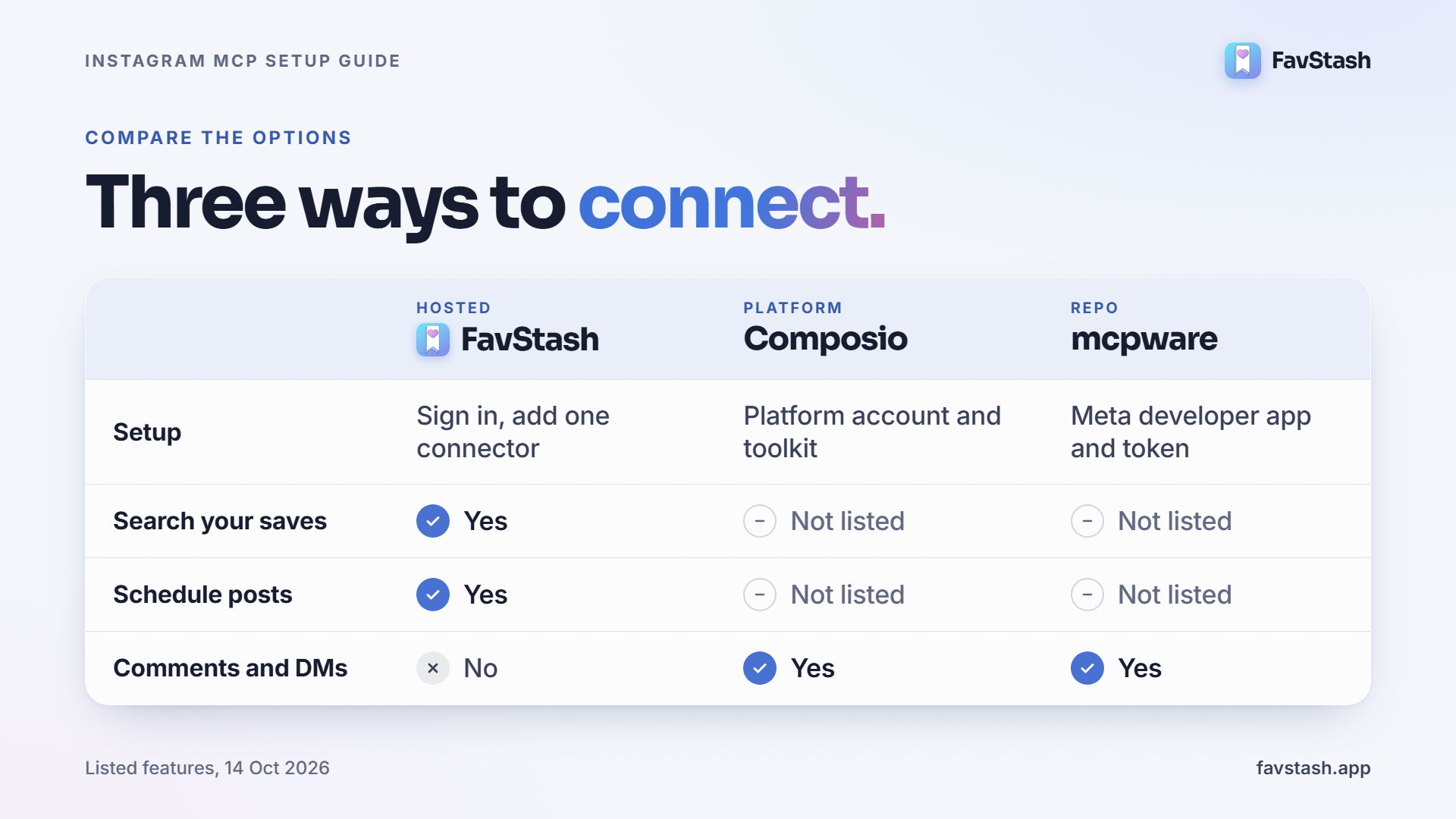
| Path | What you set up | Pick it if |
|---|---|---|
| Hosted: FavStash | Sign in with Instagram, add one connector in Claude | You want to post this week |
| Platform: Composio and similar | An account on the platform, plus the tools you enable. Its Instagram toolkit lists posts, carousels, comments and insights | You already automate other things there |
| Repo: mcpware/instagram-mcp | A Meta developer app, a long-lived token and a Business account linked to a Facebook Page. Free, MIT licensed, 23 tools | You're a developer who wants to own the stack |
How FavStash is different#
Most Instagram MCP servers are publishing pipes. They let the AI post, then leave the hard question, what should I post?, to you. FavStash starts one step earlier, with the Reels you already saved.
- It starts from a stash, not a blank prompt. You save Reels, TikToks, Shorts and LinkedIn and X posts, and FavStash keeps what it can read of each one. Instagram's own save button is a graveyard: you tap it, and you never see the post again
- Every save is enriched. FavStash's AI pulls out the transcript, the hook (the stop-scrolling moment), a short summary, the on-screen text, a description of what's shown and auto tags
- You search by meaning. Type "the lemon pasta thing" or "that reel about pricing your first digital product" and it matches on what was said in the video, not only the caption. It also recognizes creator handles and synonyms, so "browned butter sauce" finds beurre noisette
- Collections sort themselves. Describe a collection once and the AI routes new saves into it. Each save has one primary and up to two secondary collections, and you can filter by platform, date or your own tags
- One connection runs the whole loop. The same MCP server that searches your saves also reads your analytics, drafts, schedules across platforms and checks post status. That's the 19 tools above
- Approval is built in. Publishing, updates and cancellations ask for your confirmation unless you've authorized that exact action
Here's how that compares with the other two paths, going by what each lists on its own page:
| FavStash | Composio toolkit | mcpware repo | |
|---|---|---|---|
| Saved-content library and search | Yes | Not listed | Not listed |
| Publish to Instagram | Yes | Yes | Yes |
| Schedule posts | Yes | Not listed | Not listed |
| Analytics and insights | Yes | Yes | Yes |
| Comments and DMs | No | Yes | Yes |
| You host it | No | No | Yes |
When another option is the better pick. If you need comment management or DM automation, FavStash doesn't do that. If you want to host and own everything, use the repo. And note the plan limits: the free plan covers 1 channel and 100 lifetime AI enrichments, LinkedIn publishing is personal profiles only, and X posting needs a paid plan.
From idea to scheduled post: the FavStash workflow#
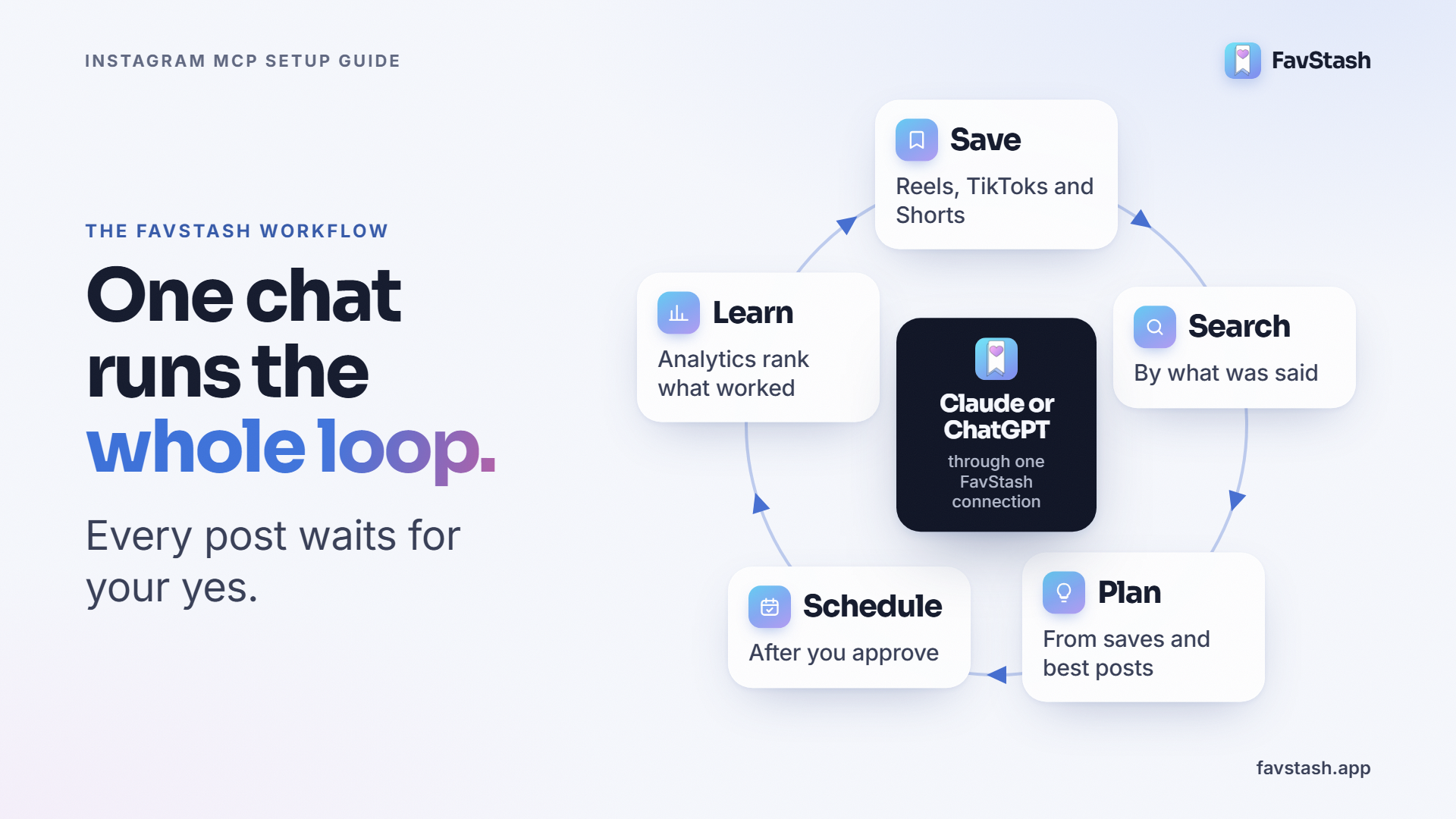
This is the loop FavStash is built for. Each stage maps to a real tool, and Claude chains them from one conversation.
1. Save. Share a Reel, TikTok or Short to FavStash, or ask Claude to save a public link for you. Saving and searching are unlimited on every plan, and you can save from Instagram, TikTok, YouTube, LinkedIn and X.
2. Let it enrich. In the background FavStash extracts the transcript, hook, summary, on-screen text and tags, then files the save into the right collection. Enrichment has an allowance: 100 lifetime on the free plan, 2,000 a month on Doom Scroller ($12.99) and unlimited on Creator Pro ($29).
3. Search and mine. Ask Claude to dig through the stash:
Search my saves for reels about pricing. Show me the hooks that open with a number.
4. Plan. Turn those saves into a plan, and check what already works on your own account before you commit:
Which of my Instagram posts performed best in the last 30 days, and why? Using that and my saved pricing reels, propose five post ideas for @youraccount.
5. Create and approve. Claude drafts captions in your voice. You bring the media, because Instagram needs at least one image or video, and Claude checks the account's publishing options first so the format fits. If AI made or materially edited the media, set the AI-generated content label. Then you approve.
6. Schedule across platforms. One request can post to several accounts, and each destination can get its own caption and media. You choose a draft, a scheduled time or post now, and the calendar shows each post as queued, draft, published or error. You can edit, reschedule or cancel anything that hasn't gone out. TikTok direct posts need privacy and interaction settings, so ask Claude to check the options first. (Searches for "tiktok mcp" went from 40 to 170 a month between November 2025 and August 2026, so you won't be the only one.)
7. Measure and loop. Instagram analytics are reconciled every six hours, and Claude can read them and rank your posts. The winners feed the next round of planning. That's the loop: save, search, plan, schedule, learn, repeat.
And the whole first half of that loop can be one prompt:
Search my saves for reels about pricing a digital product. Propose three post ideas for my Instagram, draft captions in my voice, and schedule the ones I approve for Tuesday to Thursday at 10 a.m. Eastern.
Claude shows you each post and the time before anything is queued. You say yes, and it's scheduled.
Step by step: connect Claude to Instagram with FavStash#
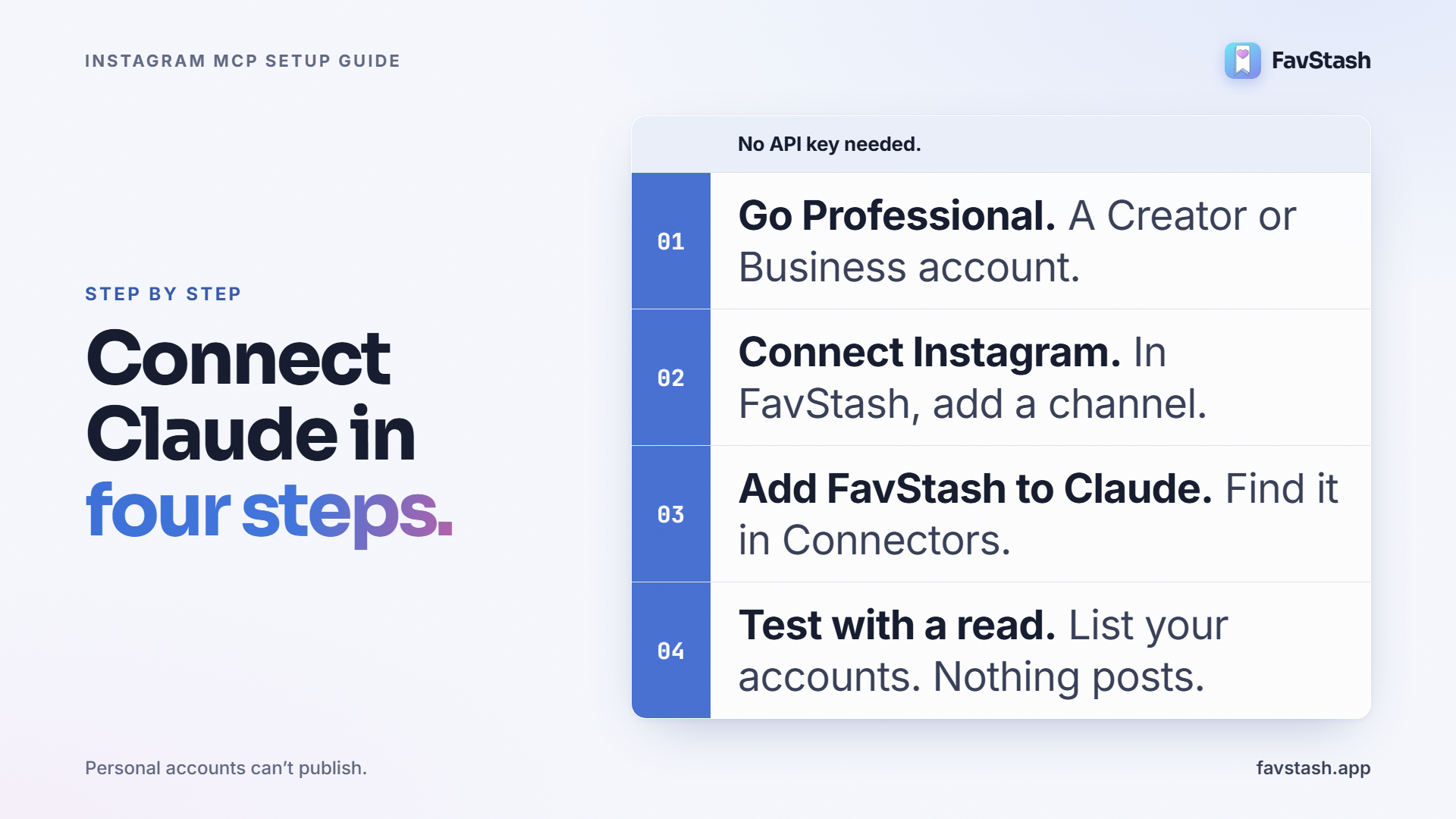
- Switch Instagram to a Professional account (Creator or Business).
- Create a FavStash account at favstash.app. The free plan works.
- Connect Instagram. In the Portal, go to Schedule, then Add channel, then Instagram, and approve on Instagram's own sign-in screen. FavStash asks only to publish content and read insights, and keeps the token server-side, away from the AI. If a connection expires, the channel shows reconnect needed under Manage channels. Channel docs.
- Add FavStash to Claude. Open Customize, then Connectors, then Discover, search "favstash," click Connect and sign in. No API key needed. Claude setup. For ChatGPT, use a custom MCP in Developer mode (needs the right plan or workspace permission). Connect your AI.
- Test with a read. Ask: "List my connected social accounts and tell me if Instagram is healthy." Nothing gets published.
- Check the limits. Ask: "What can I publish to Instagram?" We got feed images, Reels, Stories and carousels of 2 to 10 items, a quota of 100 posts per 24 hours, and an AI-generated content label to set when AI made or materially edited the media.
- Schedule one post. FavStash requires confirmation for publishing, updates and cancellations unless you've authorized that exact action. Read it before you approve. Times are stored in UTC, so ask Claude to restate yours in your time zone.
What you can do once it's connected#
- Post or schedule a Reel, image, Story or carousel. Instagram needs at least one image or video, videos publish as Reels, and Stories take exactly one file
- Plan from your saves. FavStash extracts the transcript, hook, summary and on-screen text from every Reel you save, and searches by meaning, so "the lemon pasta thing" finds it. Stash docs
- Read results in chat. "Which of my Instagram posts performed best in the last 30 days, and why?" Analytics docs
- Cross-post to YouTube, TikTok, LinkedIn personal profiles and X (X on paid plans)
What it doesn't do: it doesn't manage comments or DMs, and the Portal's stored growth history isn't available to AI tools yet.
A real month: one account, 30 days#
Here's one account from our own calendar: @leotanaka.ai, an AI creator account we run (its captions say so). We pulled these numbers by asking Claude through the FavStash MCP, covering 13 September to 13 October 2026.
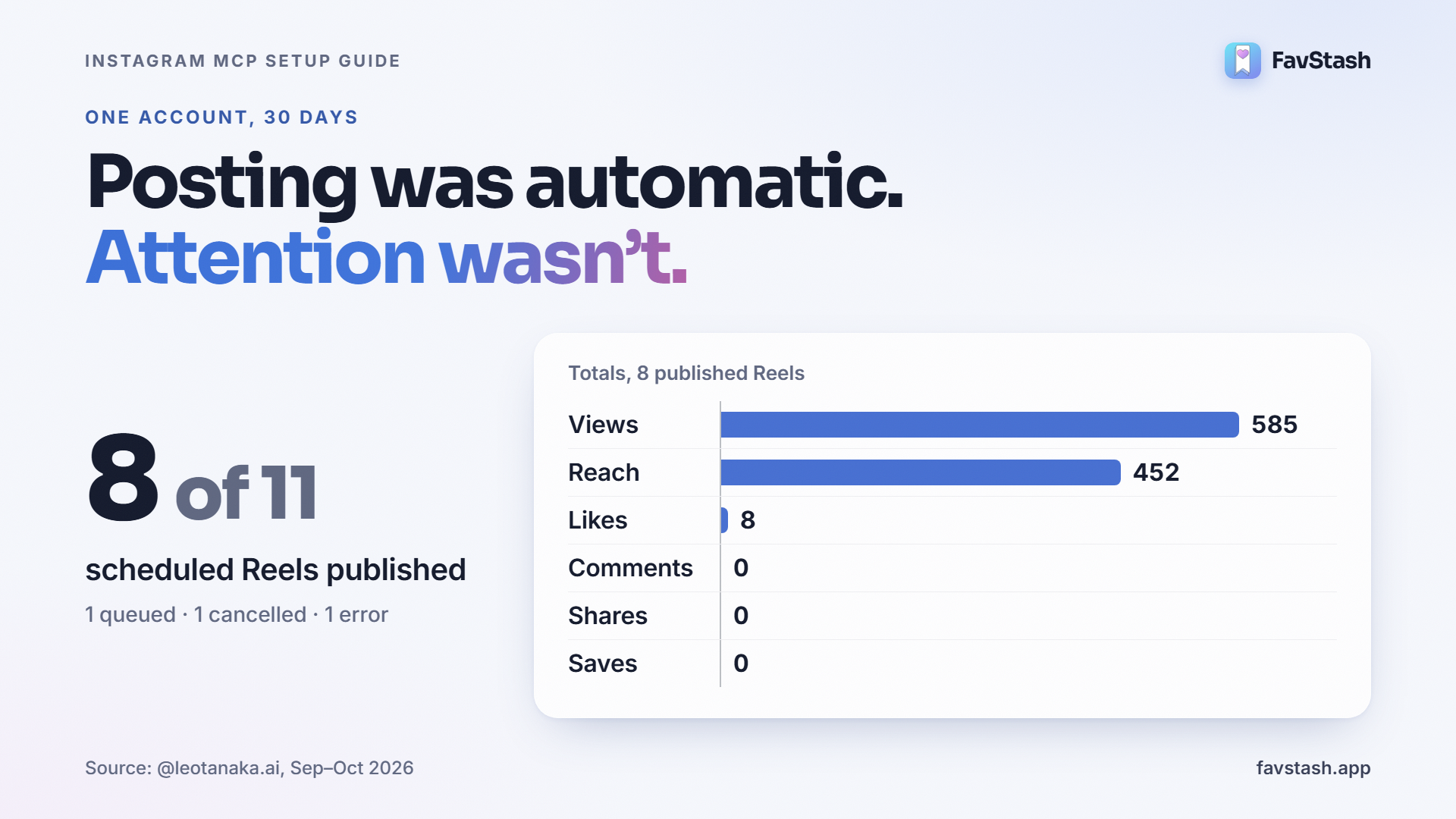
| Metric | Result |
|---|---|
| Posts scheduled | 11 (all Reels) |
| Published | 8, between 29 Sep and 12 Oct |
| Queued / cancelled / errored | 1 / 1 / 1 |
| Views / reach | 585 / 452 |
| Likes / comments / shares / saves | 8 / 0 / 0 / 0 |
| Best Reel | 328 views, 228 reach, 8 likes |
Two things stand out. First, the error: one post failed with "This account doesn't support Trial Reels," and the same Reel went out as a standard Reel about a minute later. The reason was on the calendar, so there was nothing to guess at. Second, the reach: the best Reel got 328 views and the other seven got between 6 and 78, with skip rates of 74% to 100%. The posting was automatic. The attention wasn't.
What practitioners are saying#
- A builder in r/mcp posted a one-sentence Claude Code run that published a real Instagram post: "About 2 minutes, no clicks." It's their own MCP server, so weigh that
- A creator describing a two-week batching workflow still ends with "Copy edited content into scheduler", the manual step an MCP server removes. They also say never to post AI content without reviewing it
- A small-business owner in r/ClaudeAI built an editorial plan with Claude but reports "growth has been nonexistent" after five months. Better planning didn't fix reach
What goes wrong (and what to do)#
- Nothing publishes. Check the account type first. A personal account can't publish through the API, so switch to Creator or Business
- A post errors out. Open it on the calendar and read the reason. It shows the actual cause, such as an expired connection, a platform rejection or bad media
- A scheduled week fails quietly. Connections expire. Before you schedule seven days, ask Claude to check account health, and reconnect any channel that says reconnect needed
- The AI schedules the wrong thing or the wrong time. Read the confirmation, and ask Claude to restate times in your time zone, because FavStash stores them in UTC
- Posts stop when your laptop sleeps. That's a self-hosted problem. With a hosted server the schedule lives in the vendor's calendar
Is it safe?#
It depends on how the server signs in. OAuth servers like FavStash send you to Instagram's own screen and ask for specific permissions. You can revoke access in Instagram's settings under Website permissions, then Apps and websites. FavStash also states that your saves aren't used to train any AI model. Tools that ask for your password or borrow your browser cookies break when Instagram changes and can get an account flagged. Walk away from those. And because an assistant with write access can be misled by text it reads, OpenAI warns against connecting untrusted MCP servers.
Author's take - Sam#
The surprise wasn't how well the posting worked. It was how little posting changes. Leo's account published eight Reels in two weeks with nobody copying and pasting, and still ended the month with a reach of 452. Automation fixed my Wednesday problem, not my reach problem. Let Claude plan from your saves and schedule the week. Spend your time on the hook.
Ready to connect Claude to Instagram?#
A hosted server turns this into a few minutes of setup, and a repo works if you enjoy tinkering. Either way, you stop switching tabs between your AI and your scheduler. FavStash handles sign-in, scheduling and publishing for Instagram, TikTok, YouTube, LinkedIn and X from one connection, and adds a searchable stash so the AI can plan from what you saved.
FAQs
- #instagram-mcp
- #instagram-scheduling
- #claude-instagram
- #chatgpt-instagram
- #ai-social-media
- #social-media-automation
- #mcp-server
- #ai-connection