
AI + automation
Claude for social media: post, schedule, and plan content
Can Claude post to Instagram, schedule posts, or suggest content ideas? Yes, with the FavStash connector from Claude’s connector directory. Here’s what it can do and how to set it up.
Claude can’t reach your social accounts on its own. With the FavStash connector, listed in Claude’s connector directory, Claude can schedule and publish posts, compare how your content performs, and turn the posts you’ve saved into new content ideas.
Add FavStash to Claude · Setup guide
Can Claude post to Instagram?#
Yes. Connect your Instagram account in FavStash, then ask Claude to publish a Reel, image, Story, or carousel. Claude confirms publishing actions unless you’ve already approved them. You can also save a draft and publish it later from Claude or the FavStash app.
The same works for TikTok, YouTube, LinkedIn personal profiles, and X (X publishing requires a paid plan). One request can post to several accounts, each with its own caption and media.
Can Claude schedule social media posts?#
Yes. Ask Claude to schedule a post for a specific date and time, or to place a draft on your content calendar without scheduling it yet. Scheduled posts appear in Portal → Schedule next to everything you’ve drafted, queued, published, or cancelled, so you can review or change them before they go out. See Social media scheduling for limits and posting rules.
Can Claude suggest content ideas?#
Yes, from your own data rather than generic advice:
- What already works for you. Claude compares your recent Instagram, TikTok, YouTube, and X content and explains which topics, hooks, and formats performed best. See Analytics.
- What you’ve saved. Save public Instagram, TikTok, YouTube, LinkedIn, and X posts to your FavStash stash. FavStash adds transcripts, on-screen text, and hooks, so Claude can search them by topic or creator and turn them into post ideas, hooks, and scripts. See Stash and search.
Can Claude manage my social media accounts?#
Claude can plan, draft, schedule, publish, and analyze through FavStash, but it only acts on the accounts you connect, and you can revoke access at any time in AI Connect. FavStash doesn’t manage comments or DMs, and LinkedIn personal profiles are publishing-only (no analytics).
How do I add FavStash to Claude?#
-
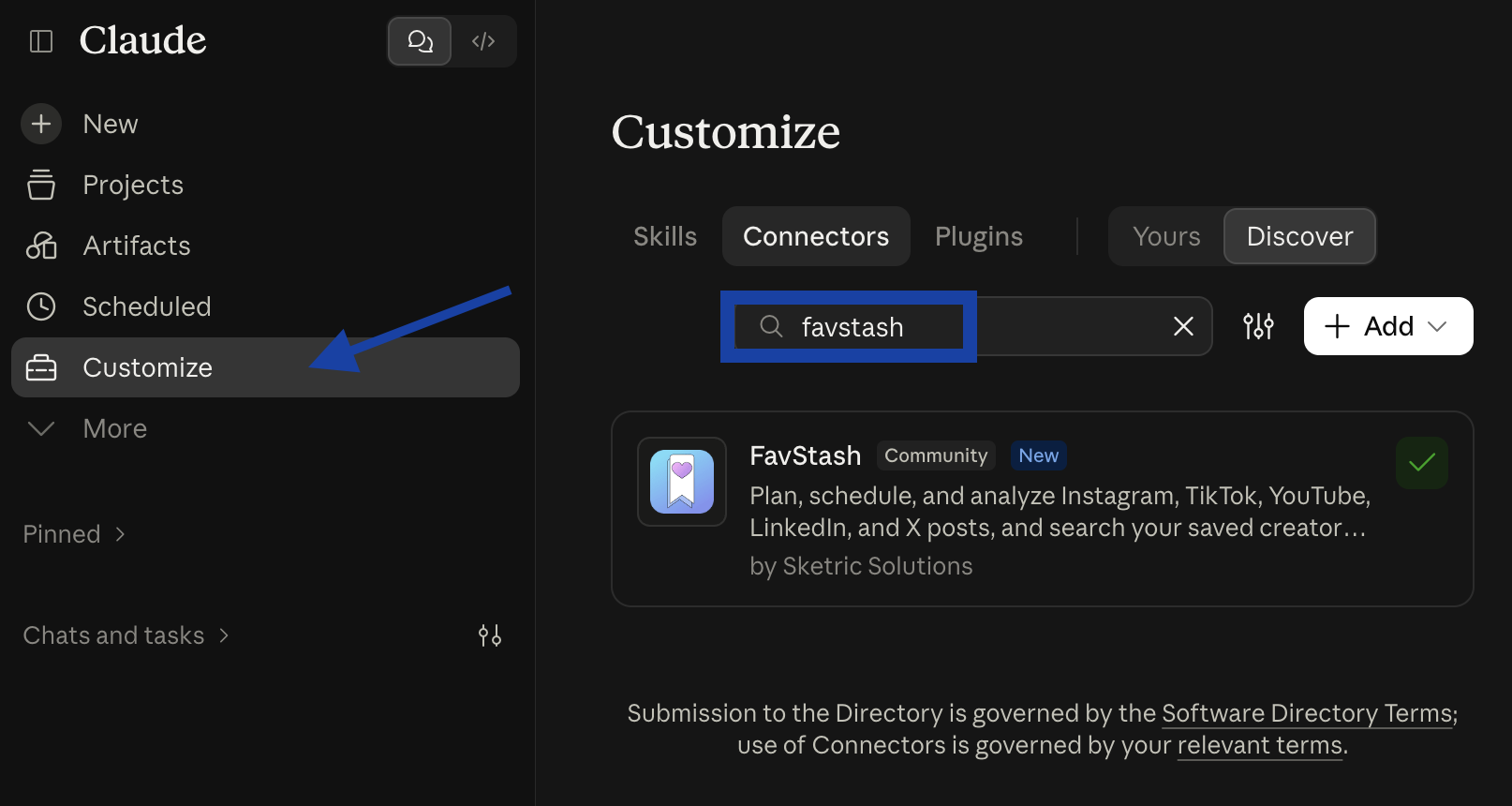
In Claude, open Customize → Connectors → Discover and search for favstash, or open the FavStash listing directly.
-
Select FavStash, then Connect. Sign in to FavStash in your browser and approve access. No API key is needed.
-
In a new conversation, try: “Which of my Instagram posts performed best in the last 30 days, and why?”
It works in Claude on the web, desktop, and mobile. If your workspace blocks directory connectors, add FavStash as a custom connector instead. For Claude Code, use the CLI.
Prompts to try#
- “Schedule this LinkedIn post for Tuesday at 9am.”
- “Draft an Instagram post for next week about my best-performing topic. Don’t publish it.”
- “What have I saved in FavStash about hooks this month?”
- “Compare my recent TikTok and YouTube Shorts. What’s working?”
- “Show my scheduled posts for this week.”
Is it free?#
FavStash has a free plan: unlimited saved items and stash searches, one connected Instagram, TikTok, YouTube, or LinkedIn account, 10 scheduled or immediate posts per month, and a 7-day analytics window where supported. Paid plans add X, more accounts, more posts, and longer analytics history. See the FAQ.