Can Claude Be Your Social Media Manager? How to Set It Up and Actually Post
Claude can plan, draft and schedule social posts once it is connected to a scheduler. Compare 3 setups, see real FavStash output, and copy 5 prompts now.
https://www.linkedin.com/in/samm007 · · 13 min read

We've been wondering if it'd be possible to make claude your go to social media manager for quite some time. And, yes, if you connect it to something that can hold your content and publish it. On its own, Claude plans, drafts and critiques.
Connected using an MCP connector, it can also schedule posts, read your analytics and search the ideas you saved, and you approve before anything goes live.
We did run every prompt in this guide on 15 October 2026 against one FavStash account: multiple connected channels across Instagram,TikTok, YouTube and 51 saved reels. The output is real, including the parts that did not look good. FavStash is our product, so where other tools do something as well, we say so.
At a Glance#
| Question | Short answer |
|---|---|
| Can Claude post on its own? | No. It has no login to your accounts. It needs a connector. |
| What does the connector do? | Holds your content, schedules and publishes it, and sends your data back to Claude. |
| Who approves posts? | You. Claude asks before it acts, unless you pre-approve a tool. |
| How long does setup take? | About 10 minutes with a directory connector. Longer with Claude Code and skills. |
| What does it cost? | Claude Pro is $20 a month. FavStash is free for 1 channel and 10 posts a month. |
A Claude social media manager is Claude connected through an MCP connector to a scheduling tool and your social accounts. Claude handles the planning, drafting, scheduling and analysis. The connector holds your content and publishes it. You approve. Without the connector, Claude stops at the draft.
Key Points#
- Claude alone cannot post, schedule or read your analytics. With a connector it can do all three.
- Three setups work today: Claude Code plus skills plus a scheduler's MCP, a scheduler's own connector, or a connector that also holds your saved ideas.
- We ran three prompts for real. One showed that our three product-pitch Reels lost about nine in ten viewers early.
- It still cannot read comments or DMs, and LinkedIn has no analytics through FavStash.
- Decision rule: if you post at least daily on more than one channel, set it up. If you post weekly by hand, skip it.
Who this is for#
- Creators, social media managers and solo founders who already use Claude and post several times a week.
- Social Media Agencies handling content for multiple accounts.
- Skip it if you post weekly and your current routine works, or if a client needs a signed approval trail inside a system they can log into (more on that below).
What Claude can and cannot do#
Most guides say Claude cannot post. That was true before connectors. It is half true now: Claude cannot post alone, and it never holds your passwords, but a connector gives it a permissioned way to act. Anthropic's connector docs say directory connectors are available on Claude web, desktop and mobile.
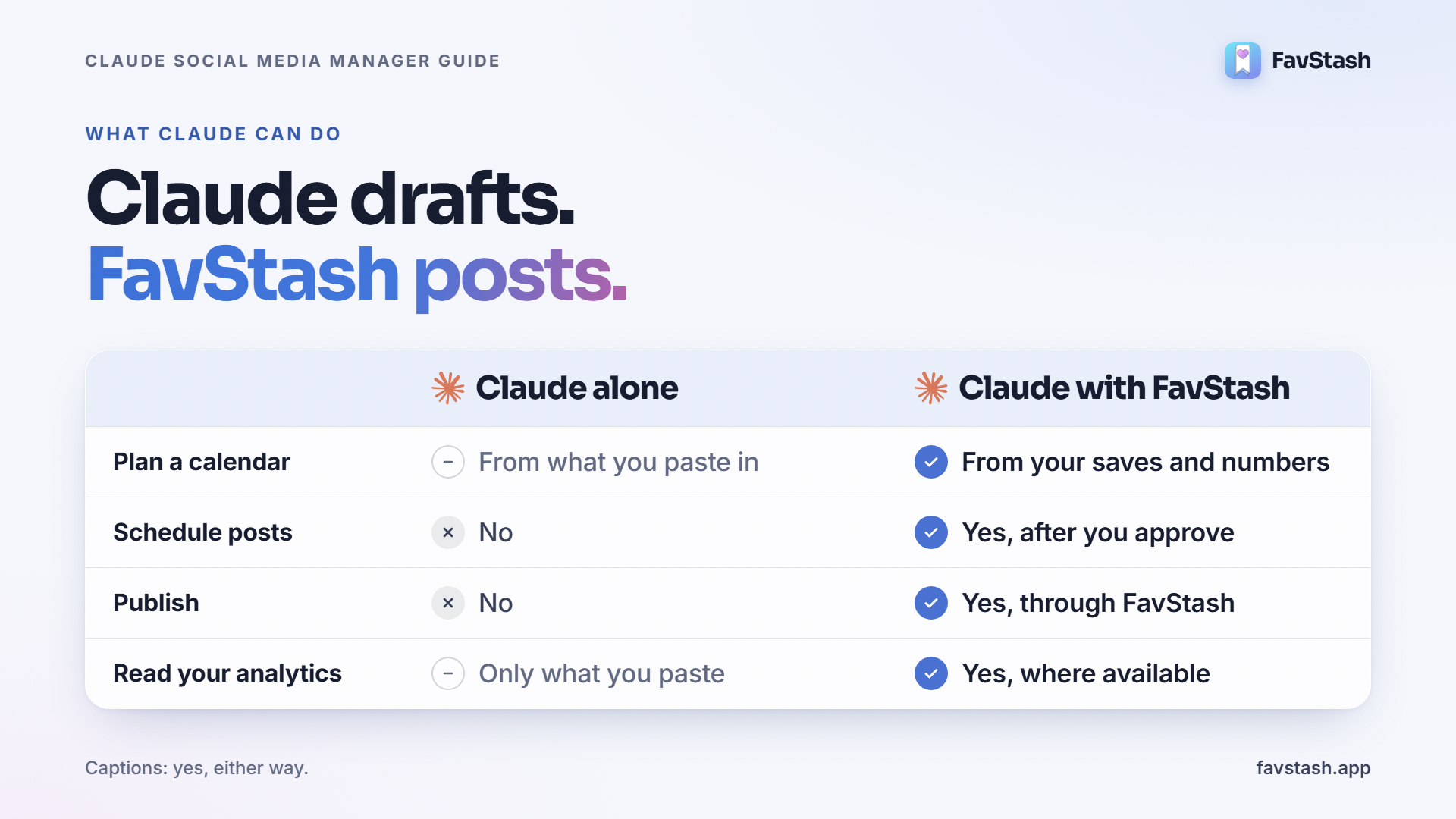
| Task | Claude alone | Claude with a connector |
|---|---|---|
| Write captions, hooks, scripts | Yes | Yes |
| Plan a content calendar | Yes, from what you paste in | Yes, from your saved ideas and your numbers |
| Schedule posts | No | Yes, after you approve |
| Publish | No | Yes, through the connector's account permissions |
| Read your analytics | Only what you paste | Yes, where the platform exposes it |
| Reply to comments and DMs | No | Depends on the tool. Not with FavStash |
Three ways to make Claude a social media agent#
| Setup | Effort | Schedules and posts | Knows your saved ideas | Reads your analytics |
|---|---|---|---|---|
| Claude Code, skills and a scheduler MCP | High | Yes, through the MCP tool | Only if you build it | Only if you build it |
| A scheduler's own connector (Buffer, Metricool, Postiz) | Low | Yes | No | Varies by tool |
| FavStash connector | Low | Yes | Yes, searchable | Yes for Instagram, YouTube, TikTok and X (X is limited) |
1. Claude Code with skills and a scheduler (technical)
A skill is a markdown file that tells Claude your voice and platform rules. Ryan Doser's guide (published 24 July 2026, updated 30 September) connects Claude Code to Blotato's MCP, which publishes and schedules to platforms including Instagram, LinkedIn and TikTok. His stated baseline is $29 a month for Blotato plus $20 for Claude Pro. Skills alone do not post: Will Francis's nine free skills cover captions, hooks, repurposing and monthly planning, and only draft. Best for people comfortable in a terminal.
2. A scheduler's own connector
Buffer's MCP is free to connect, schedules posts and manages the queue, but cannot pull analytics through MCP yet. Metricool's connector schedules into your Metricool calendar for review and can analyze performance. Both are quick to add. Each one stops at its own data: Claude sees your queue, not the reels you saved last month.
3. A connector that holds your saved ideas
FavStash adds two things. Claude can search your saved reels by meaning (captions, transcripts, on-screen text, hooks), and it can read analytics, including posts that were not published through FavStash. It publishes to Instagram, TikTok, YouTube, LinkedIn and X (X needs a paid plan). The same connector works in the ChatGPT version of this setup. Pick it when your idea library matters. Pick a plain scheduler when it does not.
How to set up Claude with FavStash#
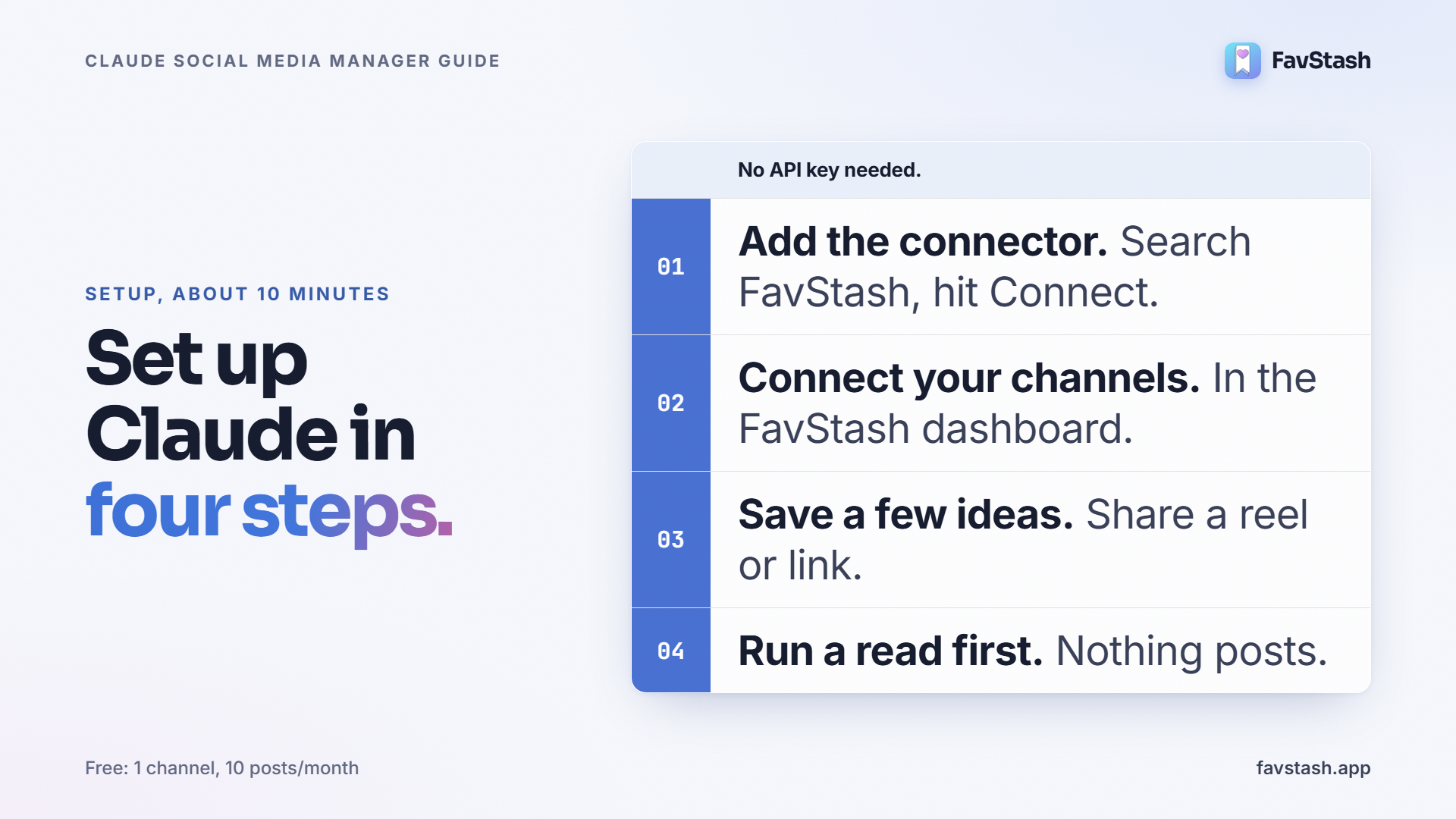
- Add the connector. In Claude, open Customize > Connectors > Discover, search "FavStash", select Connect, sign in and approve. There is no API key. You can also add FavStash to Claude from its own page. For Claude Code, use the CLI and local bridge in the Claude Code setup docs.
- Connect your channels in the FavStash dashboard. The full list is on the channels FavStash publishes to page.
- Save some ideas. Share a reel or paste a link. FavStash stores the transcript, hook and on-screen text. The free plan has unlimited saves and 100 lifetime AI enrichments.
- Run a read-only prompt first. "Which of my Instagram posts performed best in the last 30 days?" changes nothing. FavStash exposes 19 tools, and you want to see the reads work before you let it schedule.
- Connect a video editing/content creation pipeline to draft your posts and make your reels. For Carousels, check out AI Brand Creator and for video editing, see this Github repo which is making big waves.
- Ask for a plan, review each post, then approve.
Scheduled posts stay in the FavStash calendar after you close Claude, so the chat does not have to stay open.
Real prompts, real output#
We ran three prompts on 15 October 2026. They were reads only: we did not schedule new posts for this test. Output is trimmed. The analytics account is Leo Tanaka's Instagram, an AI creator account run by the FavStash team, and its captions say so.
Prompt 1: search what you saved
Search my saved reels for strong hooks about AI tools and automation.
Claude got five matches back, each with transcript, hook line, hook type and tools mentioned.
| Creator | Hook type FavStash tagged | Pattern |
|---|---|---|
| @socialinfluencestudios | problem-solution | Comment-for-the-tool-list call to action |
| @john_lee_official | problem-solution | Same reel as the next row |
| @john_lee_official | list-promise | Saved a second time, tagged differently |
| @itsemilyhiggins | list-promise | Numbered list of six free tools |
| @mavgpt | curiosity | Superlative opener on one design tool |
Two honest findings. The same reel saved twice came back twice with two different tags, so dedupe your library. And three of the four unique reels are tool-list formats, which tells Claude your saves lean on one format. A plan built from them will too.
Prompt 2: read your own numbers
How did the Leo Tanaka Instagram account do in the last 30 days, and which Reels worked best?
Totals for 15 September to 15 October: reach 454, views 588, likes 8, comments 4, shares 0, saves 0. Top five Reels by views:
| Posted | Reel type | Views | Reach | Early skip rate | Avg watch |
|---|---|---|---|---|---|
| 29 Sep | Dev-dating meme | 328 | 228 | 43.9% | 5.6s |
| 9 Oct | FavStash feature pitch | 79 | 70 | 89.0% | 2.0s |
| 5 Oct | Connector-directory pitch | 56 | 49 | 88.2% | 3.4s |
| 1 Oct | Startup-grind meme | 48 | 43 | 74.4% | 3.2s |
| 12 Oct | Search feature pitch | 33 | 30 | 90.3% | 1.6s |
Early skip rate is the share of views Instagram records as skipped within the first 3 seconds. The two memes held viewers best. The three product pitches lost close to nine in ten viewers early. The sample is five Reels on a small account, so treat it as something to test, not a result. FavStash also says Meta does not expose second-by-second retention curves, so Claude can rank Reels but cannot show you the exact second people left.
Prompt 3: check the queue and the rules before scheduling
What is scheduled for the next seven days, and what does Instagram require for a video post on this account?
The queue came back with its first 10 posts, all on 15 October UTC across YouTube, Instagram and TikTok. Three of them:
| Publish (UTC) | Channel | First line |
|---|---|---|
| 14:00 | Instagram (FavStash) | "Unlimited reels. Zero credits." |
| 14:00 | YouTube (FavStash) | "You run a café." |
| 14:00 | TikTok (FavStash) | Same café video, TikTok direct-post settings |
The YouTube and TikTok rows share one video with different titles and settings per platform. For Instagram, FavStash reported four content types (feed image, Reel, Story, carousel of 2 to 10 items) and an AI-generated content label to declare when media was made or materially altered by AI. That is the kind of rule you want Claude to check before it schedules, not after.
Claude social media manager prompts you can copy#
Replace the brackets. Prompts 1 and 2 are the ones we ran above.
- Hook research. "Search my saved reels for strong hooks about [topic]. Group them by hook type and tell me which pattern my saves lean on."
- Read my numbers. "Rank my last [30] days of [platform] posts by views. For the top and bottom three, compare hook, format and early skip rate, then suggest three changes."
- Weekly plan. "Using those hooks and my numbers, plan [5] posts for [platform]. For each: format, hook, and which saved item inspired it. Do not schedule anything yet."
- Draft in my voice. "Write post [2]. Voice notes: [3 sentences]. Give three variants under [length]. Flag any claim you cannot back up."
- Schedule with review. "Show me the caption, media, platform and time for each post. When I say approve, schedule them. Then list what is queued for next week."
Keep batches to about a week or two. One practitioner on r/buildinpublic found a full month in one go came out too generic and settled on two weeks.
Claude social media manager skills#
Skills save you repeating your voice rules in every chat. Will Francis's set is a good start for drafting. For video, FavStash's open-source editing skills (Apache-2.0, 24 stars at time of writing) let Claude Code build Reels, TikToks and Shorts with captions and motion graphics, then hand them to FavStash to schedule. Skills shape the output. The connector is still what posts it.
What this setup still cannot do#
- LinkedIn is publish only. Personal profiles only, with no analytics or post history. Organization pages need separate approval.
- X needs a paid plan, and threads are not supported. There is no Facebook or Threads publishing.
- Instagram needs a Business or Creator account.
- No trend feed. Claude works from your saves and your numbers. If a format takes off overnight, save examples first.
- Approvals can be switched off. Claude offers "Allow always" for trusted tools, and Anthropic tells you to review approval requests carefully. We would keep approval on for anything public.
- Free plan limits: 1 channel, 10 posts a month, 7 days of analytics.
What practitioners are saying#
Four themes recur in Reddit threads from late 2025 to September 2026. Commenters who sell tools are flagged.
- Layer, not replacement. In r/SocialMediaManagers, a client-facing social media manager called AI a layer on top of your scheduler, not a replacement. Clients need a timestamped sign-off record, not a chat log. They use AI for research and drafting, not a scheduler MCP.
- Volume decides. A Pallyy employee in the same thread (disclosed) said it is probably not worth it if you do not publish much. Another commenter posts twice a day with Claude and Blotato and lets clients delete what they dislike. We would not copy that.
- Generic output is the main complaint. A small-business owner on r/smallbusiness gave up on automated posting because everything sounded generic and fake. The r/buildinpublic author who batches two weeks at a time had an unedited post called out for sounding like ChatGPT.
- Data helps when a human approves. Buzzfy posted that Claude read their first 18 Instagram posts, found 39.5% early swipe-away on real-footage Reels against 65.4% on text Reels, then planned and scheduled a week. They approved every post. A vendor's own small sample, so one data point.
Author's take#
The numbers above are small, and the lesson is not about Claude. It read the account correctly: the product-pitch Reels were the weakest. A connector makes that read take seconds. What to make next is still your call.
My rule: let Claude plan, draft and schedule, and keep one human step before publish. If you post at least daily across channels, the saved hours are real. If an unedited post would embarrass you, turn approvals on and leave them on.
Ready to try it?#
Start with a read-only prompt, then add one channel and one scheduled post. When you are ready, add FavStash to Claude on the free plan.
FAQs
- #claude
- #social-media-management
- #mcp
- #ai-agents
- #scheduling