LinkedIn MCP: How to Connect Claude or ChatGPT to LinkedIn and Post Safely
Connect Claude or ChatGPT to LinkedIn with an MCP that posts through LinkedIn's official API, not your cookies. Safe setup steps, limits and prompts that work.
Sam · · 11 min read
Your next client will probably check your LinkedIn before they reply to you. That's exactly how people buy now, especially in the B2B space.
LinkedIn has over 1.4 billion members, and content views are up 16% on last year. 40% of B2B marketers say it's their most effective channel for high-quality leads.
LinkedIn is probably the only social platform where you don't have to go viral. Showing up most weeks is plenty. A team on Reddit ran posting against cold outreach for 90 days. Their inbound DMs from posts went from 2 a month to 14. Those deals closed in about 9 days. Cold deals took 5 to 6 weeks.
"Every single inbound lead already understood what we did before they messaged us." (r/b2bmarketing)
Showing up consistently is the hardest part, though. Founders on Reddit call LinkedIn "another full-time job". One freelancer spent 7 hours on a Saturday and got about 12 posts out of it. That's less than two weeks of content.
Everyone asks Claude or ChatGPT to write their LinkedIn posts. Fair enough. But neither of them can post to LinkedIn by itself. For that you need a LinkedIn MCP, and quite a few of them can get your account restricted.
This guide shows you the safe kind and an easy five-minute setup. It also covers running LinkedIn from the same chat as your Instagram, TikTok, YouTube and X. I checked everything against LinkedIn's, Anthropic's and OpenAI's own docs in November 2026. I also read about 40 Reddit and Quora threads, a few of them painful. So, let's understand LinkedIn a bit better!
TL;DR#
- A LinkedIn MCP lets Claude or ChatGPT act on your LinkedIn. Most scrape profiles or send invites. Only a few actually publish your posts.
- LinkedIn's only official MCP is Hiring Pro. It only posts jobs.
- Ask any tool one thing: official OAuth, or my cookies? Cookie and bot tools are the ones getting accounts restricted.
- FavStash posts to your LinkedIn profile through LinkedIn's official API, on the same calendar as Instagram, TikTok, YouTube and X.
- Claude drafts, you approve, and only then does anything go out.
What is a LinkedIn MCP?#
A LinkedIn MCP is a connector that lets an AI assistant act on your LinkedIn account. MCP itself (Model Context Protocol) is the plug AI apps use to talk to other tools.
There are three kinds, and the risk is very different between them.
| Type | What it does | How it logs in | Account risk | Examples |
|---|---|---|---|---|
| Data / scraping | Reads profiles, companies and jobs | Your session cookie, or a browser it drives | High | GitHub servers, Apify |
| Outreach | Sends invites, DMs and InMails | Cookies, extensions or cloud browsers | High | Sales outreach tools |
| Publishing | Posts to your feed | LinkedIn's official API, after you say yes (OAuth) | Low | FavStash, Buffer, Postiv |
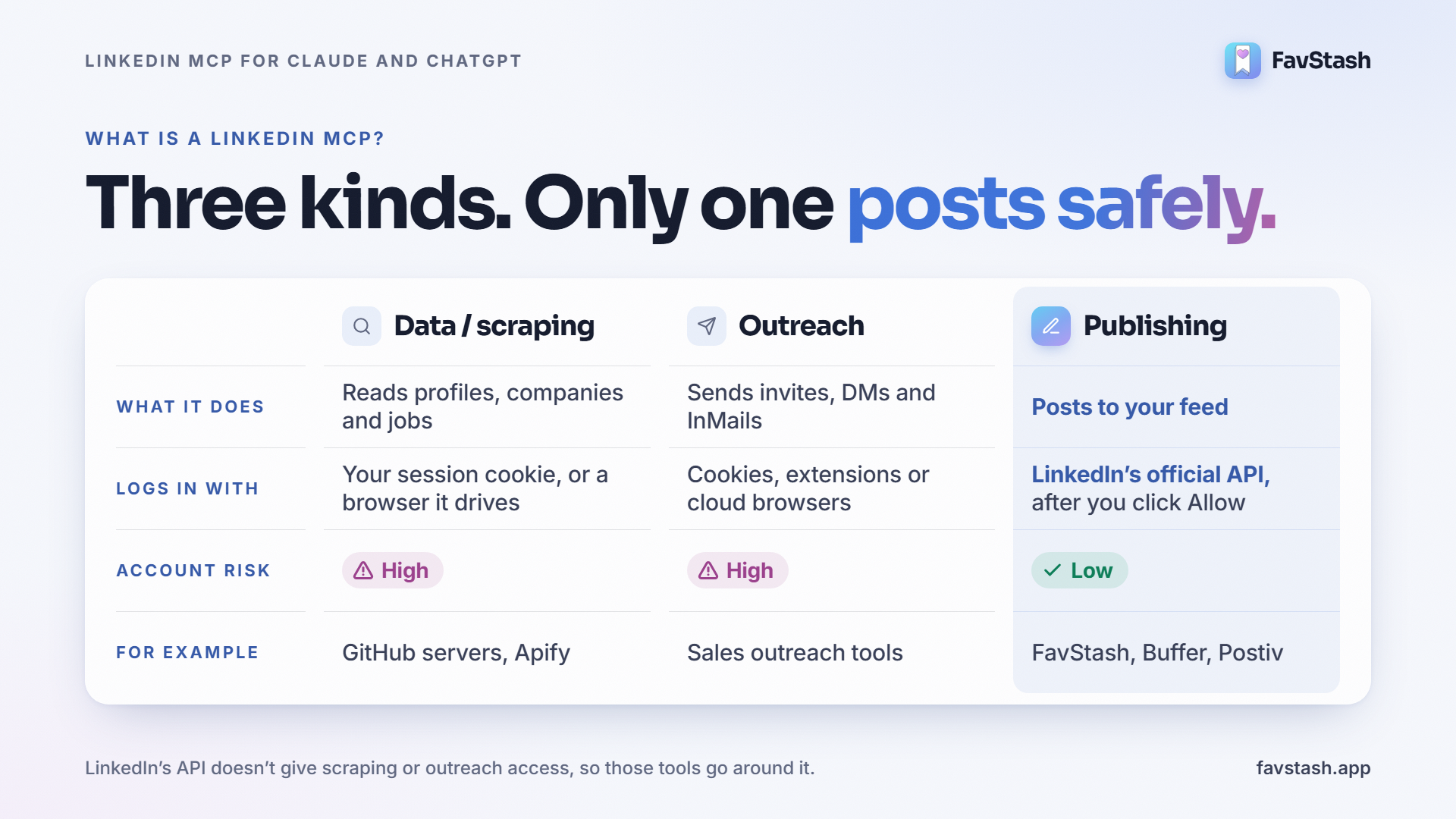
Most "connect Claude to LinkedIn" guides push the first two. Leads on autopilot, they promise. The catch is that LinkedIn's API doesn't give that kind of access, so those tools go around it. That could become risky.
Does LinkedIn have an official MCP?#
Sort of. LinkedIn launched Hiring Pro inside Claude on October 21, 2026, but it's a hiring tool. The Hiring Pro connector drafts and posts one free job listing. Your feed, profiles and messages are off limits to it.
Posting to your feed goes through a different door. LinkedIn's Share on LinkedIn API lets an app post for you once you grant it the w_member_social permission. You say yes on a LinkedIn screen. You can take it back whenever you want. The safe publishing tools all use this route.
Is a LinkedIn MCP safe?#
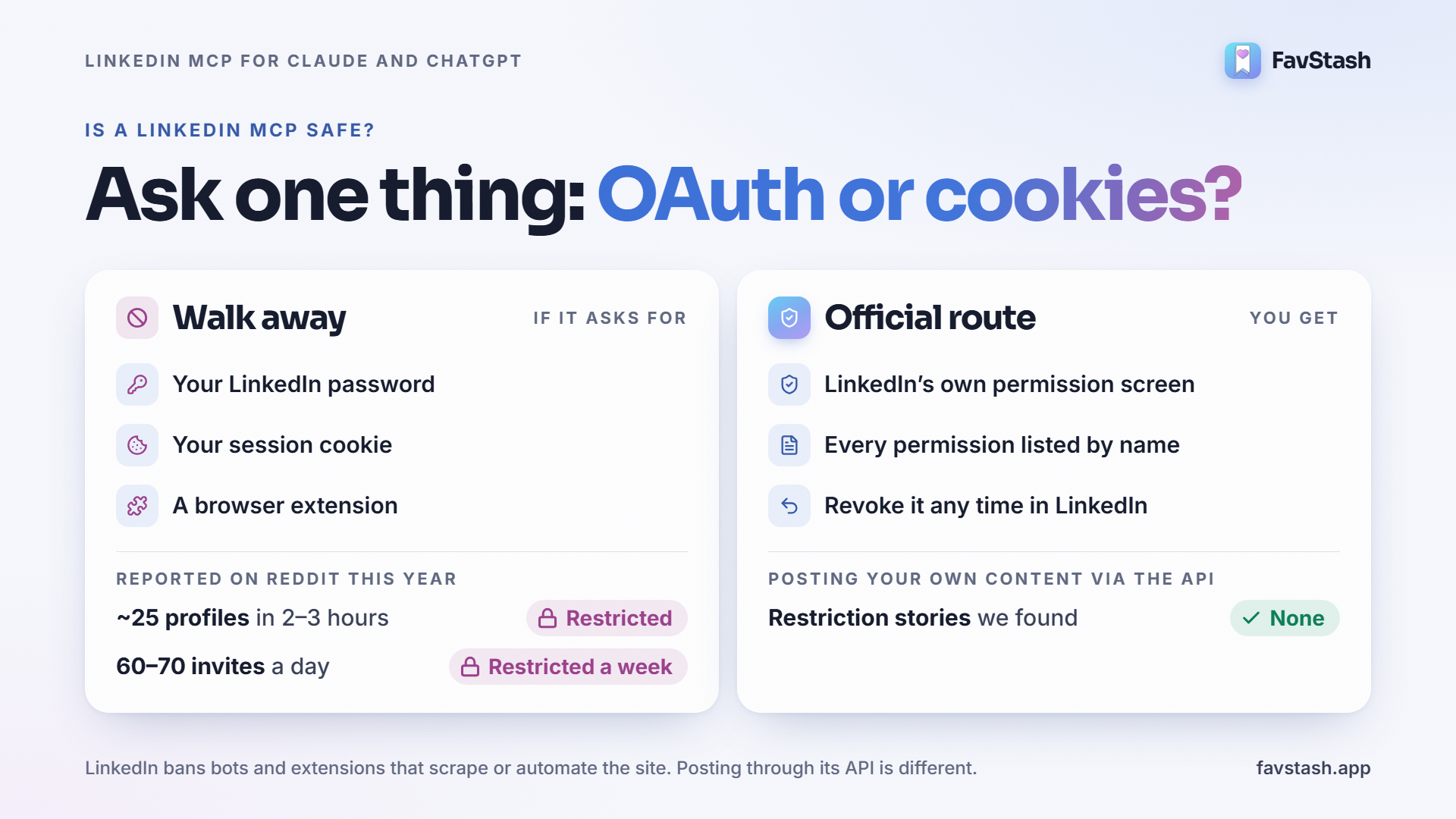
The publishing kind, mostly yes. Scrapers and outreach bots, no.
LinkedIn's Prohibited software and extensions page doesn't mince words. Crawlers, bots, plug-ins and extensions that scrape or automate the site are banned. People who use them "risk having their accounts restricted or shut down." Posting your own content through LinkedIn's own API, with your permission, isn't what that page is about.
A Reddit user tried nine LinkedIn tools and got it down to one question:
"Does this tool use official OAuth, or does it scrape my cookies?" (r/LinkedInTips)
Honestly, if you remember one thing from this post, make it that. And in case you need convincing, these are restriction stories people posted on Reddit this year:
| What they did | What happened |
|---|---|
| Let Claude browse ~25 profiles over 2 to 3 hours | Restricted for "unusually high volume of LinkedIn profile data" (r/recruiting) |
| Used a Chrome extension to send 60 to 70 invites a day | Restricted for a week, three weeks in (r/socialmedia) |
| Gave a tool their session cookie | "You are handing over your entire account session" (same r/LinkedInTips thread) |
| Posted their own content through the official API | Not one restriction story we found |
Twenty-five profiles. That's a slow morning of research, and it was enough.
What practitioners are saying: one 75-comment thread about automating LinkedIn with Claude had a pretty clear pattern. The people with no problems approved everything before it went out. A tool builder on the same subreddit puts official APIs at "very low risk" and scraping at "high risk".
Decision rule: does the tool want your password, a cookie or a browser extension? Walk away. Does it send you to a LinkedIn screen that lists permissions? That's the official route.
How to connect Claude to LinkedIn#
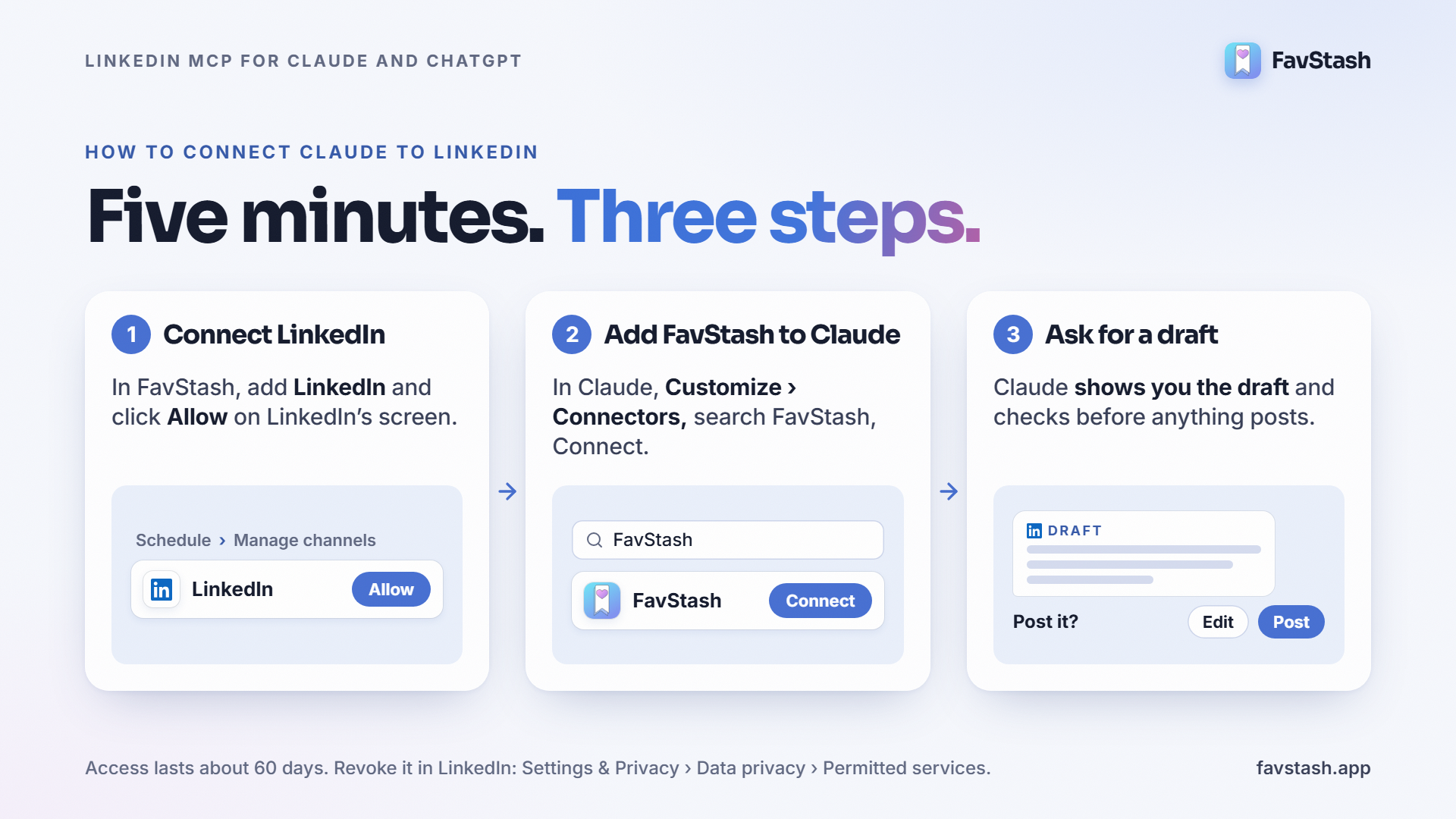
Claude doesn't come with a LinkedIn connector, so you add one. With FavStash it's about five minutes, most of it spent clicking Allow.
Step 1: Connect LinkedIn to FavStash
- Sign up free and go to Schedule → Manage channels.
- Pick LinkedIn. LinkedIn opens its own permission screen.
- Actually read it. It names FavStash and lists what it wants, including permission to post for you. Then click Allow.
That's LinkedIn's standard OAuth flow. What it means for you:
- FavStash never sees your password.
- Your access token stays on FavStash's servers. Claude doesn't get to see it either.
- Access lasts about 60 days, then FavStash asks you to reconnect.
- Changed your mind? Revoke it in LinkedIn under Settings & Privacy → Data privacy → Permitted services.
Step 2: Add FavStash to Claude
- In Claude, open Customize → Connectors and search for FavStash.
- Click Connect, sign in to FavStash and approve.
- Not showing up? Choose Add custom connector and paste this:
https://mcp.favstash.app/mcp
It works in Claude on web, Desktop, Cowork and mobile. Claude's free plan lets you add one custom connector (Anthropic's guide). Anything else you need is in the FavStash setup guide for Claude and ChatGPT.
Step 3: Test it
Open a new chat, switch FavStash on and paste this in:
"Write a LinkedIn post about the biggest mistake I made pricing my first product. Keep it under 150 words. Show me the draft before you post anything."
Claude writes a draft. Change whatever doesn't sound like you. Then say "post it" or "schedule it for Tuesday 9am" and it goes to your profile. Claude checks with you first, every time something is about to publish.
How to connect ChatGPT to LinkedIn#
It works the same way. The bit that trips people up is the plan.
OpenAI's help article on custom MCP servers says full MCP access, posting included, is for ChatGPT Business, Enterprise and Edu. Pro gets read-only access. Plus and Free aren't listed at all, which is a bit annoying if you're a solo founder.
If your plan allows it:
- In ChatGPT, open Plugins and choose Add custom MCP server.
- Call it FavStash, paste the URL below and pick OAuth.
- Sign in to FavStash, approve, and switch it on in your chat.
https://mcp.favstash.app/chatgpt/mcp
OpenAI renames these menus a lot. If yours look different, their article will have the current names.
Post to LinkedIn and every other platform from one chat#
A LinkedIn-only tool sorts out LinkedIn, and that's it. If you're on LinkedIn for leads, you're probably also posting Reels, Shorts or X threads. Cue five apps and a Sunday spent copying captions between them.
"Each platform needs different types of content, and it gets tiring." (r/content_marketing)
FavStash keeps LinkedIn on the same calendar as Instagram, TikTok, YouTube and X. You can schedule LinkedIn posts right in the web app. Or ask Claude once and let it handle every platform:
"Turn the Reel I posted on Monday into a LinkedIn post with the key lesson, a Short with the same video, and an X post. Schedule LinkedIn for Tuesday 9am and the rest for Wednesday."
Here's what LinkedIn will take:
| Format | Through Claude or ChatGPT | In the web composer |
|---|---|---|
| Text | Up to 3,000 characters | Up to 3,000 characters |
| Images | Up to 20 JPEG or PNG | Up to 10 |
| Video | One MP4 | One MP4 |
| PDF carousel | One PDF (native document post) | One PDF |
PDF carousels are the sleeper hit here. Plenty of posting tools skip them.
If you also want the bigger picture, read how scheduling works across Instagram, TikTok and YouTube, or set up the same Claude connection for Instagram.
Prompts that don't sound like AI slop#
People are tired of AI posts on LinkedIn. You've scrolled past hundreds. One Claude user on Reddit said it straight: "I feel like all I get is slop" (r/ClaudeAI).
I don't think a newer model fixes that. What helps is giving Claude something real to work from. Start from a blank prompt and you'll get a post that could be anyone's.
This is what the FavStash Stash is good for. Share a LinkedIn post, Reel, TikTok or Short to it and it keeps the transcript and the hook. Later, Claude can search your saves by what was actually said in them.
A few prompts worth stealing:
- "Find the LinkedIn posts I saved about pricing and draft one in my voice, using my own story about our first customer."
- "Here are my last 10 LinkedIn posts. Match their tone and length for this week's 3 drafts."
- "Take the hook from the TikTok I saved yesterday and rewrite it for a LinkedIn audience."
- "Show me everything I have scheduled on LinkedIn next week."
Pro tip: approving posts only protects you if you read them. Someone in a LinkedIn MCP thread noticed people "start hitting approve on the 30th draft without reading it" (r/mcp). So batch three posts a week. Not thirty.
What it won't do#
Better to know these up front:
| Limit | Why |
|---|---|
| Personal profile only | Company Pages need a separate approval from LinkedIn |
| No LinkedIn analytics | LinkedIn's self-serve API doesn't share personal-profile stats, so check them in LinkedIn |
| No DMs, invites or comment replies | The posting API doesn't cover these. Tools that offer them are going around it |
| Reconnect about every 60 days | That's LinkedIn's standard access window |
| Times queue in UTC | Double-check your time zone when you schedule |
| Edits after posting happen on LinkedIn | Once a post is live, you edit it there |
Need automated outreach? That's a different kind of tool, and it comes with the risks above.
Author's take#
Reddit loves a posting vs outreach fight. One thread claimed posting is a waste of time and outreach is gold. The best reply under it argued that posts are what make outreach convert in the first place.
I'm firmly with that reply. Posting is where Claude can save you real hours without putting your account on the line. Outreach is different. That's where the restrictions happen, so I'd keep it in your own hands.
My rule: post two or three times a week through an official API tool. Read and approve every draft. Send DMs and invites yourself. And never hand an AI agent your LinkedIn session.
Start with one post this week#
FavStash is free to start. You get one channel, four posts a month and the Claude and ChatGPT connector. When you want more channels, there's a paid plan. For now, connect LinkedIn, add FavStash to Claude and ask it for your first draft.