Can Claude Edit or Create Videos? Full Set-up guide
Can Claude edit videos? Yes, and create them. With free skills, FFmpeg and HyperFrames, Claude Code or Codex turns ideas into finished Reels, TikToks or Shorts.
Sam · · 14 min read
Can Claude edit videos? Yes. But only with the right skills, tools and guidelines can those edits be made usable or you can create entire videos from scratch.
Bundle Claude Code (or OpenAI's Codex) with free creator skills and two open-source libraries, FFmpeg and HyperFrames, and it turns into a short-form studio on your computer. It writes the script. It cuts your takes. It adds captions, sound and motion graphics. Then it renders a finished Reel, TikTok or Short. No footage? It builds the whole video from your product's screens or photos.
Here's what that gets you:
- Your evenings back. The cutting, captioning and resizing you dread is handed off.
- Edits modeled on what already works. Start from a reel you saved, and Claude adapts its structure to your topic and voice.
- More tests for the same effort. Three hooks on one body means three versions ready to post.
- Idea to posted in one chat. Approve the final cut, and it schedules to Instagram, TikTok and YouTube.
One catch: none of this happens in the chat window. Claude's chat can't open your footage. The agent on your computer can.
To write this, I read Anthropic's help pages, the skills' source code, the guides that rank for this question and 15+ Reddit threads from creators and editors who tried it.
TL;DR#
- Yes, Claude can edit and create videos. It works in Claude Code or Codex, not the chat, paired with the right skills plus FFmpeg and HyperFrames.
- Edit: your raw clips go in. A captioned 9:16 Reel, TikTok or Short comes out.
- Create: a saved idea and a reference reel become your own video. No footage? It builds one from your product.
- The value: hours of editing handed off, hook variants to test and posting from the same chat.
- Why most AI edits look amateur: they start from a blank prompt. Start from a reel that already worked.
- The cost: about $20 a month for Claude Pro or a ChatGPT plan with Codex. The skills and libraries are free.
- Want the whole loop? Turn Claude into your video editor, from saved idea to posted reel.
Can Claude edit videos? Here's what works today#
Short answer: Claude edits video through tools, not through the chat box.
Claude's file uploads list documents and images only. So you can't drop a clip into claude.ai and get an edit back. Claude Code is different. It runs on your computer, where your videos are. It reads files, runs editing tools and saves the result.
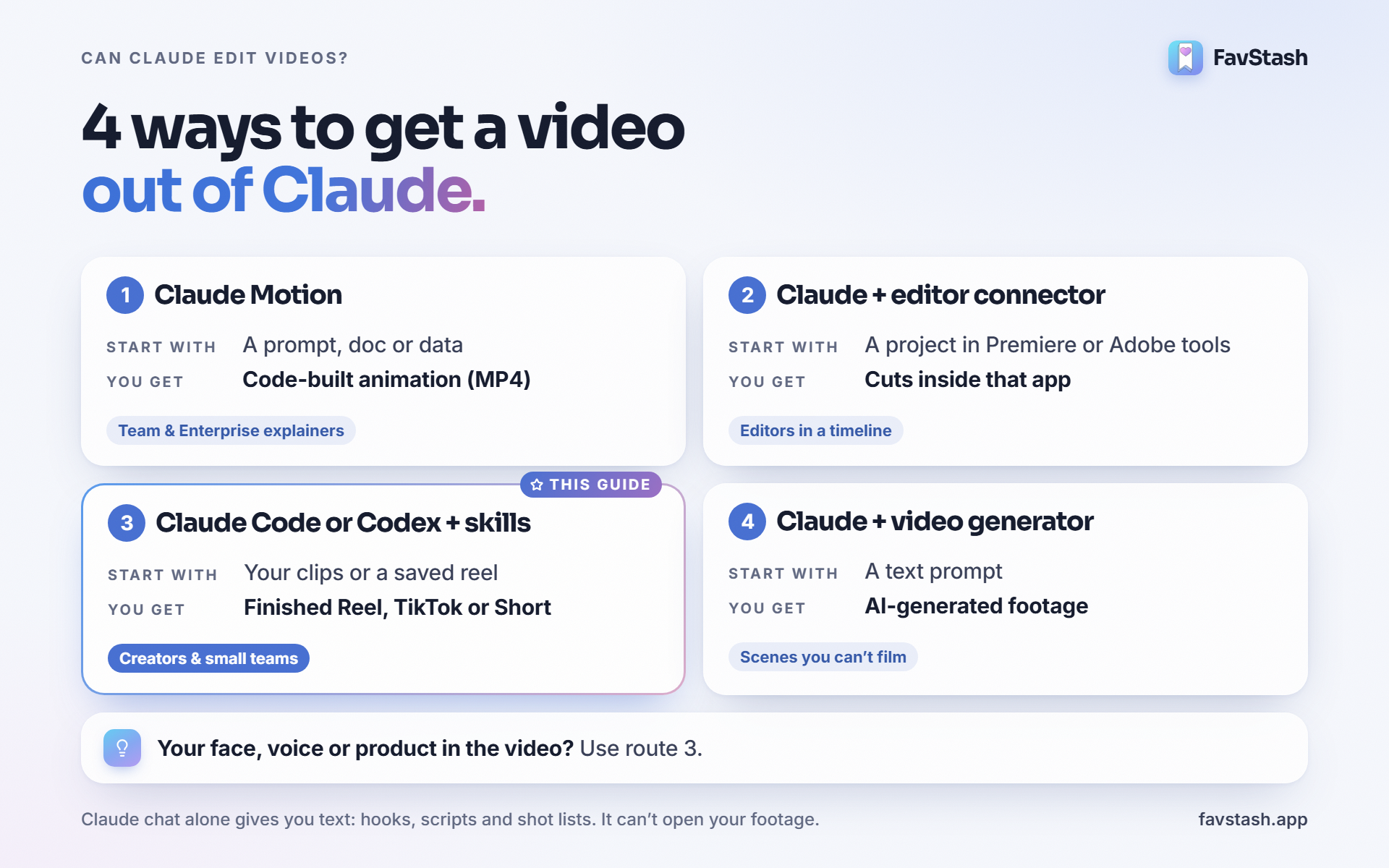
There are four ways to get a video out of Claude. Pick by what you start with.
| Route | You start with | You get | Best for |
|---|---|---|---|
| Claude chat (web, app) | A prompt | Text only: hooks, scripts, shot lists | Planning, not editing |
| 1. Claude Motion | A prompt, a doc or data | A code-built animation (MP4) | Explainers on Team and Enterprise plans |
| 2. Claude + an editor connector | A project in an app you already use | Cuts and changes inside that app | Editors who live in Premiere or Adobe tools |
| 3. Claude Code or Codex + skills | Your clips, or a saved reel to adapt | A finished Reel, TikTok or Short | Creators and small teams posting weekly |
| 4. Claude + a video generator | A text prompt | AI-generated footage | Scenes you can't film. Not your face |
Claude Motion is a beta for Team and Enterprise plans. It builds animations in code. It doesn't use your footage or make realistic people.
For route 2, Adobe launched Adobe's connector for Claude in April. It can reformat a horizontal clip for Reels or Shorts. Editors on Reddit also wire Claude into Premiere and DaVinci Resolve through MCP plugins.
Route 3 is what this post is about. It takes raw clips and returns a post-ready short with no editing app open. Claude Code is included with Claude Pro at $20 a month. The free plan doesn't include it.
Decision rule: if your face, voice or product is in the video, use route 3. If it's a data explainer and you're on a Team plan, try Claude Motion first.
Can Claude make videos from scratch, or only edit them?#
It can create them. Creating just means more of the work starts with Claude.
You save a reel you love. Claude reads how it works, writes your version in your voice and edits the clips you film. The output is a new video. It's yours.
You can also skip the camera. One of the free styles, product-motion-ads, builds a whole reel from your product: its screens, photos or website. It's motion graphics in code, so you can change one word or color without starting over.
That last point matters. As one Reddit commenter explained, Claude builds video with code, not a generative model. So you can fix one detail without re-rolling the whole video.
How Claude edits a video it can't watch#
Claude video editing works differently from a timeline app. Claude doesn't watch your video like you do. It reads it.
- Transcribe. A local speech model writes down every word with a timestamp.
- Pick. Claude reads the transcript and chooses what to keep. It drops retakes and dead air.
- Cut and render. FFmpeg cuts the clips. HyperFrames, HeyGen's open-source renderer, adds captions and motion graphics.
- Check. It pulls still frames from the export to check layout and text.
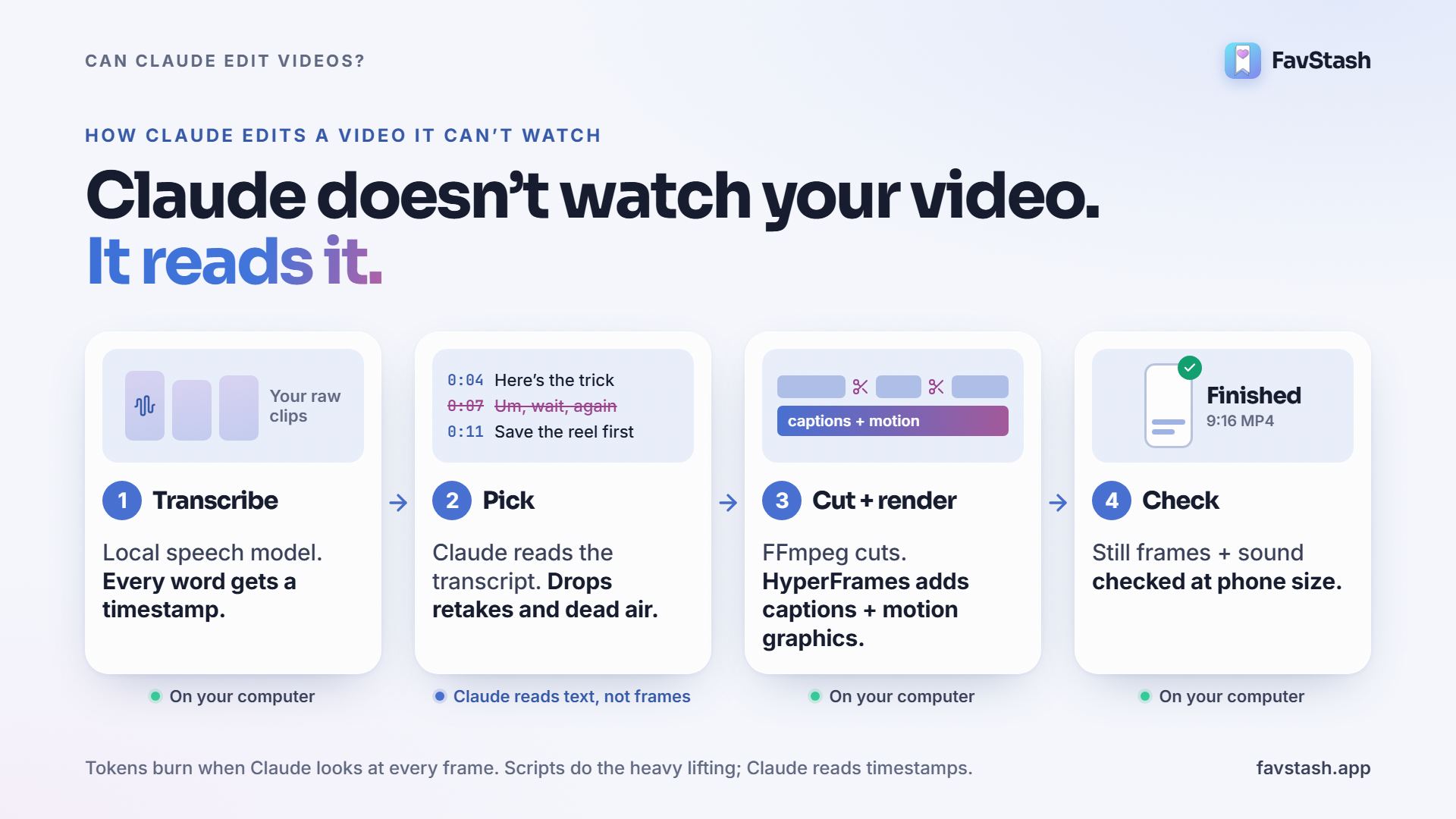
This is also why some people burn through their limits fast. One creator said a single 50-second Short used 40% of a session. The likely cause, per the top reply: every frame Claude looks at is an image in its context. Scripts should do the heavy work. Claude should read timestamps.
Checking matters even more. A developer who edited a pitch video this way wrote:
"Claude can't see or hear the output. It told me sync was fine while my lips were visibly off." (Codes_with_roh, r/ClaudeCode)
So the FavStash skills don't trust the edit. They review the encoded export at phone size and check the sound before you see it.
Why most Claude edits look amateur (and the fix)#
This is the biggest complaint on Reddit. An 800-upvote r/ClaudeAI thread asks why a home-made Claude edit looks nothing like the motion-graphics reels on Instagram. When someone posted a quick Claude edit of a talking-head clip, the comments called it slop.
The cause is simple. A prompt describes a style. A reference shows it. Timing, caption size, the first frame and where the sound lands are hard to put into words. They're easy to copy from a video that already works.
One of the most useful replies in that first thread said to give Claude reference images for typography and style. Same idea, one step further. Give it the whole reel.
That's why we built the loop around your saves. When you save a reel to FavStash, it keeps the transcript, hook, on-screen text and creative format, where available. Your agent reads all of it before it writes a word.
Decision rule: call a reference "proven" only if it got about 3x its creator's usual views. Below that, it's a format reference. Copy the structure, but don't assume the hook works.
One rule doesn't bend. Copy the hook, structure and pacing. Never reuse someone else's footage, voice or graphics. Film your own.
How to make a reel from a saved idea with Claude Code and FavStash#
Set it up (about 10 minutes)
- Open a local agent. Claude Code (desktop app or terminal) or Codex. It has to run on the computer where your videos are.
- Paste one prompt. Copy the setup prompt from the FavStash start page and press Enter. It's also in the README of the free FavStash Creator Skills on GitHub.
- Let it install. It downloads the skills, FFmpeg and HyperFrames. Then it renders a tiny test video. Click Allow when asked.
- Sign in to FavStash. That's the connector. Skip it if you only want editing.
- Link your accounts. Instagram, TikTok, YouTube or LinkedIn. Only needed for posting and results.
You don't need to code. Your agent types the commands. Transcription runs on your machine, so there's no extra API key for it. The tools render locally too. Your AI provider still sees any clips, frames or transcripts you share with it.
[Screenshot: the setup prompt pasted into Claude Code, with the test render finished]
Make the reel
| Step | You say | Your agent does | Skill |
|---|---|---|---|
| 1. Save | Share a reel to FavStash from Instagram, TikTok or YouTube | Stores it with its transcript, hook and on-screen text | FavStash app |
| 2. Break it down | "Find 3 reels I saved that I could make my own version of." | Checks which ones are proven and why they worked | find-ideas |
| 3. Make it yours | "Break down this reel and write 3 hooks for my idea in my voice." | Writes the hooks, one shared body and a filmable brief | write-script |
| 4. Film | Drop your takes in a folder | Nothing yet. This part is you | |
| 5. Edit | "Edit these clips into a 30-second reel with captions." | Cuts retakes, adds captions, sound and motion graphics, keeps text in safe zones | edit-video + a style |
| 6. Review | "Make the captions bigger and cut the second pause." | Revises and re-checks at phone size | edit-video |
| 7. Post | "Post it Friday at 6pm on Instagram and TikTok." | Shows you the file, cover, caption, account and time, then waits for your go | publish-and-analyze |
| 8. Learn | "Which of my last 10 videos kept people watching longest?" | Compares watch time and skip rate where the platform shares them | publish-and-analyze |
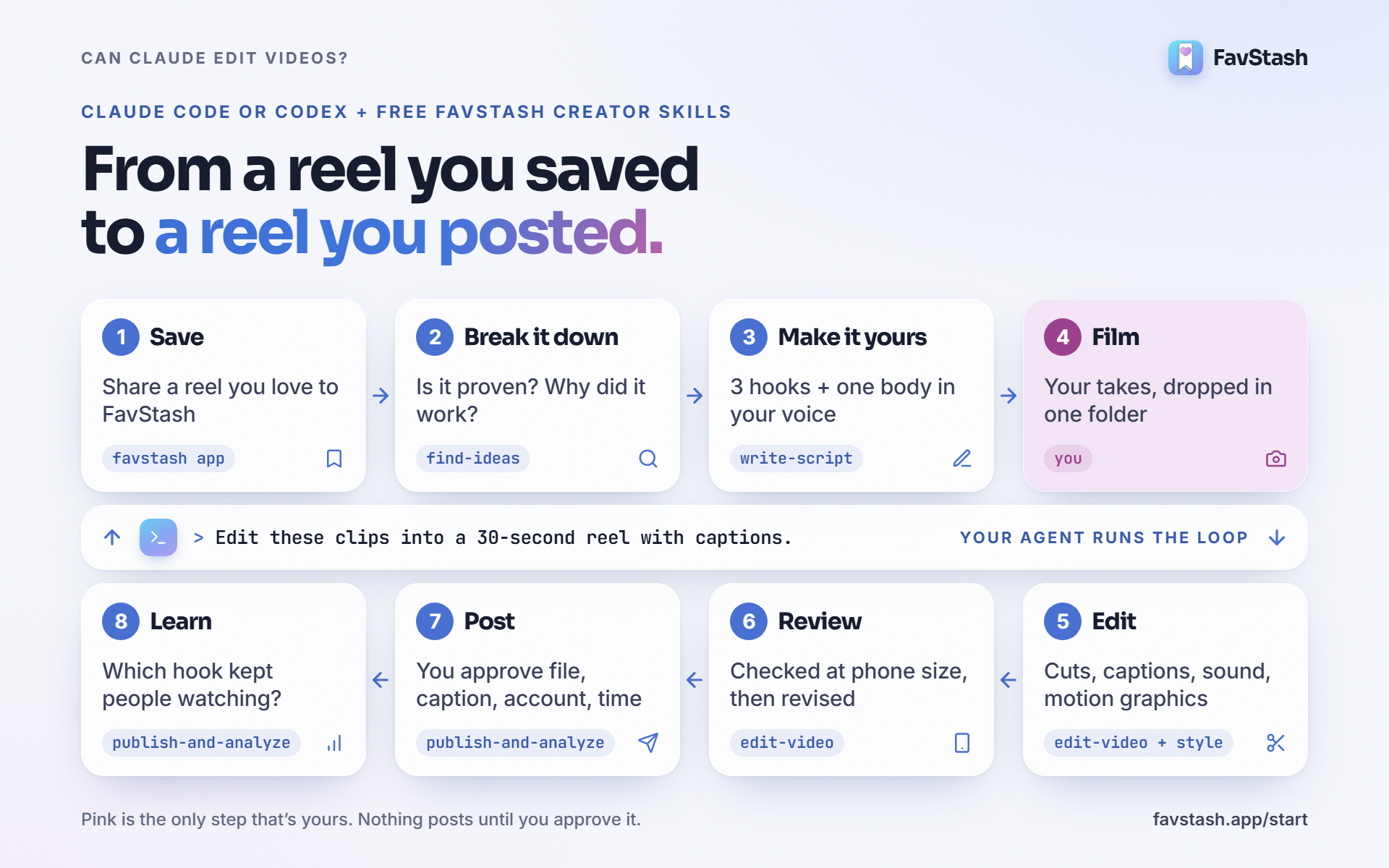
[Demo video: one saved reel turned into a finished reel, start to finish]
Pick a look or let your agent choose. The styles include adaptive-glass for product and tool videos, breakout-card for talking-head tips and text-over-footage for quick jokes. Or give it your fonts and colors, and your look wins.
Nothing posts on its own. When you're happy with the edit, post it from the chat after you approve the exact file, caption, account and time.
Pro tip: render a 15-second sample first. Fix the captions and pacing there. Then reuse that setup for every reel after it.
Turn your reels into leads#
Most small businesses don't post for fun. They post to get contacted. The problem is the editing. One owner in r/smallbusiness said editing eats 10+ hours a week. A roofline-lighting installer on r/ClaudeAI called video the weakest part of the whole business.
A reply in the r/smallbusiness thread nails the goal: short-form should be "a repeatable proof system that shows the business is active, competent, and worth contacting." That's a template problem, and agents are good at templates.
Here's how the pieces fit:
- Give the reel a job. The script skill asks what the reel is for: reach, saves, comments and leads, or a product action. A lead reel ends with one clear ask.
- Use a comment keyword. "Comment GUIDE and I'll send it." FavStash's Instagram comment-to-DM automation sends the link to everyone who comments.
- No time to film?
product-motion-adsmakes a giveaway or product reel from your screens or photos. - Batch it. Film five takes in one sitting. Let the agent edit all five while you work.
How much time does it save? Be careful with any number. One UGC creator said cutting pauses and dead air alone took 30 to 45 minutes per video before automating it. Your videos aren't theirs, though. A rough way to size it: three videos a week at two hours each, plus posting, is about 7.5 hours you could hand off. Setup, rendering and your review still take time.
What it costs (and the token reality)#
| Item | Cost | Notes |
|---|---|---|
| Claude Pro | $20/mo ($17/mo yearly) | Includes Claude Code. Max plans give more usage |
| ChatGPT with Codex | From free | Codex comes with ChatGPT plans. Free and Go are for light tasks |
| FavStash Creator Skills | Free | Open source, Apache-2.0 |
| FFmpeg and HyperFrames | Free | Open source, installed for you |
| FavStash | Free plan | Unlimited saves, 1 channel, 4 posts a month. Paid from $12.99/mo |
Is $20 enough? Creators disagree, and it depends on how much you revise.
- One said the $20 plan handles about one video per 5-hour limit.
- Another said a trailer used 20 to 30% of a 5-hour limit.
- A YouTuber edited every recent video on the $20 plan after weeks of tuning the workflow. Each one still took 2 to 4 hours in total.
Pro tip: revisions eat the limit, not the first cut. Lock your template once. After that, change only the script and the clips.
Common mistakes#
- Starting from a blank prompt. You get a generic edit. Start from a reel you saved.
- Letting Claude look at every frame. That's where tokens go. Cut from the transcript and check with a few stills.
- Transcribing the whole take in one go. Restarts hide inside it. The edit skill splits at pauses and keeps your last full take.
- Skipping the phone check. A caption that looks fine on a laptop can sit under the like button.
- Trusting "sync is fine." Watch it with sound before you post.
What creators are saying#
Editors aren't pretending this is magic. They're saying it does the boring part.
"Rarely does an untouched LLM assembly make it into my final cut." (Plumbous, r/VideoEditors)
The same thread is full of editors using Claude for the rough assembly. One said Claude, connected to Premiere, does about 90% of the job. The human value is the last 10%. Another cut a 4 to 5 hour job to 45 minutes, but says AI is still weak at story and pacing.
A UGC creator who built custom editing skills said the same. It cuts dead air and adds captions. Hook and pacing are still on you, and captions need a check for brand names.
Quora is less helpful. Most answers to "can AI edit my video" are still lists of generator apps, with Claude used only for the script.
Author's take#
I think "can Claude edit videos" is the wrong question. It can. The better question is what you hand it.
Hand it a blank prompt and you'll get what Reddit calls slop. Hand it a reel that already worked, plus your own clips, and it has a brief a human editor would recognize. That's the part most guides skip, and it's why we built the loop around saves.
Where I'd use it: talking-head tips, product explainers and hook tests where you need three versions of the same reel. Those versions are perfect for testing hooks with trial reels. Where I'd still open CapCut: trend audio and the last bit of taste. The agent gets you to a solid draft fast. You still decide what's good.
Start with a reel you already saved#
You don't need a new editor or a new app. You need a reel that worked, your own clips and an agent that knows what to do with them.
Turn Claude or Codex into your video editor. Setup takes about 10 minutes, the skills are free, and you can post from the same chat.