How to Schedule a Post on Instagram, TikTok and YouTube From One Calendar
Schedule Instagram, TikTok and YouTube posts from one calendar. Why built-in schedulers fall short, how to set it up, track results and turn comments into DMs.
Sam · · 15 min read
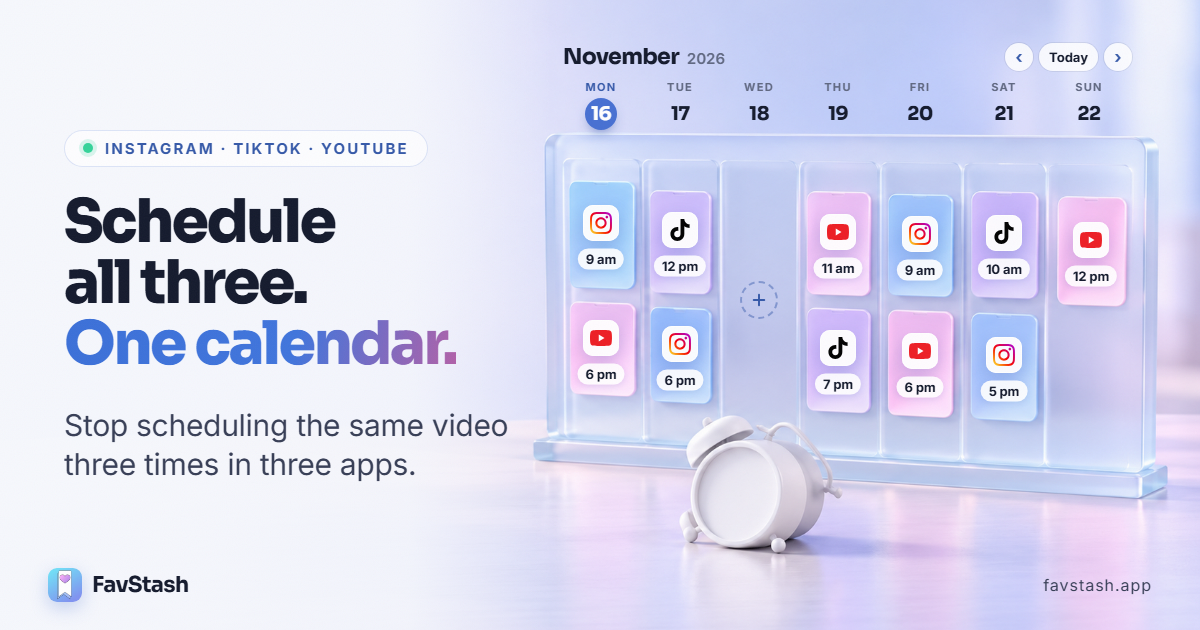
Can you schedule posts on Instagram, TikTok and YouTube? Yes, all three platforms come with a built-in schedular. On Instagram it's under More options when you create a post, on TikTok it lives on the desktop site and in the separate TikTok Studio app, and on YouTube you pick Schedule under Visibility. So, it's not very convenient to say the leaast. What none of them will do is show your whole week across the three, and that's the part that matters when you're posting everywhere.
This guide covers how to schedule a post on Instagram, TikTok and YouTube without doing it all three times.
If you are a business owner or creator making short-form video, you probably have more content than you post. The bottleneck is the boring bit in the middle: open Instagram, upload, caption, post. Do it again on TikTok, then YouTube. An hour later people are commenting "link?" and somebody has to reply. Miss three days and all three accounts go quiet together.
A social media manager on Reddit counted roughly ten small decisions behind each post, so fifty in a five-post week:
"nobody burns out from a job with ten decisions a day and clear feedback. people burn out from fifty with none." (kevin784, r/content_marketing)
Scheduling won't make those decisions for you, but it does remove a few of them for good, like what time to post and whether you actually posted. I set everything below up on our own FavStash workspace (17 channels across the three platforms), checked the native steps against each help center in November 2026, and read 30-odd Reddit and Quora threads on the same problems.
TL;DR#
- Instagram, TikTok and YouTube can all schedule natively, but the option sits somewhere different in each app
- ChatGPT and Claude can write captions but can't post them anywhere on their own.
- No native tool shows Instagram, TikTok and YouTube on one calendar, so you can't see your week/month at a glance.
- FavStash schedules posts to all three from a single web calendar, from 2 minutes to 22 days ahead, and you can drive it from Claude.
- Afterwards you can compare results across the three platforms, and Instagram comments with your keyword get your link by DM automatically.
Why the built-in schedulers fall short#
Every platform has scheduling now. What trips people up is everything around it.
1. They're hard to turn on
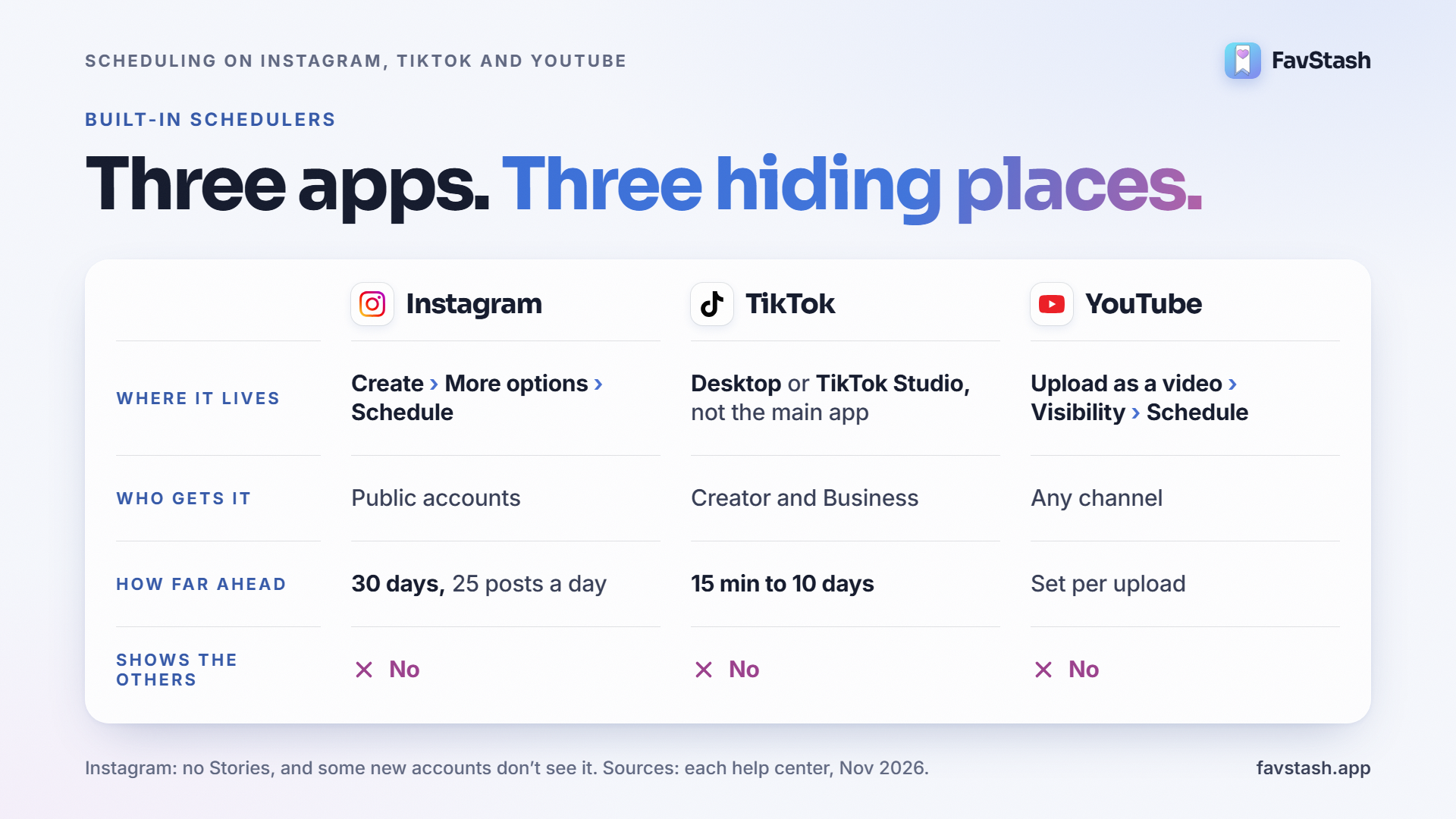
| Platform | Where the scheduler lives | Who gets it | How far ahead |
|---|---|---|---|
| Create → More options → Schedule this post | Public accounts. Some new accounts don't see it yet | 30 days, 25 posts a day. No Stories | |
| TikTok | Desktop upload page, or the separate TikTok Studio app. Not the main app | Creator and Business accounts | 15 minutes to 10 days on desktop |
| YouTube | Upload as a video, then Visibility → Schedule. Not from the Shorts camera | Any channel | Set per upload |
Instagram moved both the toggle and the queue in early 2026, and for weeks Reddit was full of people asking where their Schedule button went. TikTok is worse in a quieter way. One founder wrote that the creators they meet still set phone alarms to post, because nobody told them the scheduler exists outside the app they open every day. The table draws on Instagram's Help Center, Sprout Social's TikTok guide and YouTube's Help Center.
2. You can't run them from ChatGPT or Claude
ChatGPT and Claude will happily write a week of captions & edit your videos, but they can't upload anything to Instagram, TikTok or YouTube on their own. One marketer on Reddit had AI produce a full week of posts, then still had to download and schedule every file by hand, which was the slow part all along.
3. You never see your week on one calendar
This is the gap that matters most if you run a brand, or more than one account. Instagram keeps your queue as a list under Account type and tools. TikTok keeps its own inside TikTok Studio. YouTube shows a "Scheduled" label in the Content tab of YouTube Studio. Meta Business Suite does have a proper calendar, but it only covers Facebook and Instagram.
That means a simple question like "what's going out on Thursday?" takes three apps to answer, and an empty Wednesday or two launches on the same morning slip through. When someone on r/content_marketing asked for a scheduler they'd actually stick with, the wish list was short:
"Just somewhere I can plan my posts, schedule them ahead of time and see everything on a calendar would be enough." (Commercial-House-795, r/content_marketing)
Decision rule: posting to one platform a few times a week? Stick with the built-in scheduler. Two platforms or more, or a second account? You'll want a calendar that shows everything in one place.
How to schedule posts on Instagram, TikTok and YouTube with FavStash#
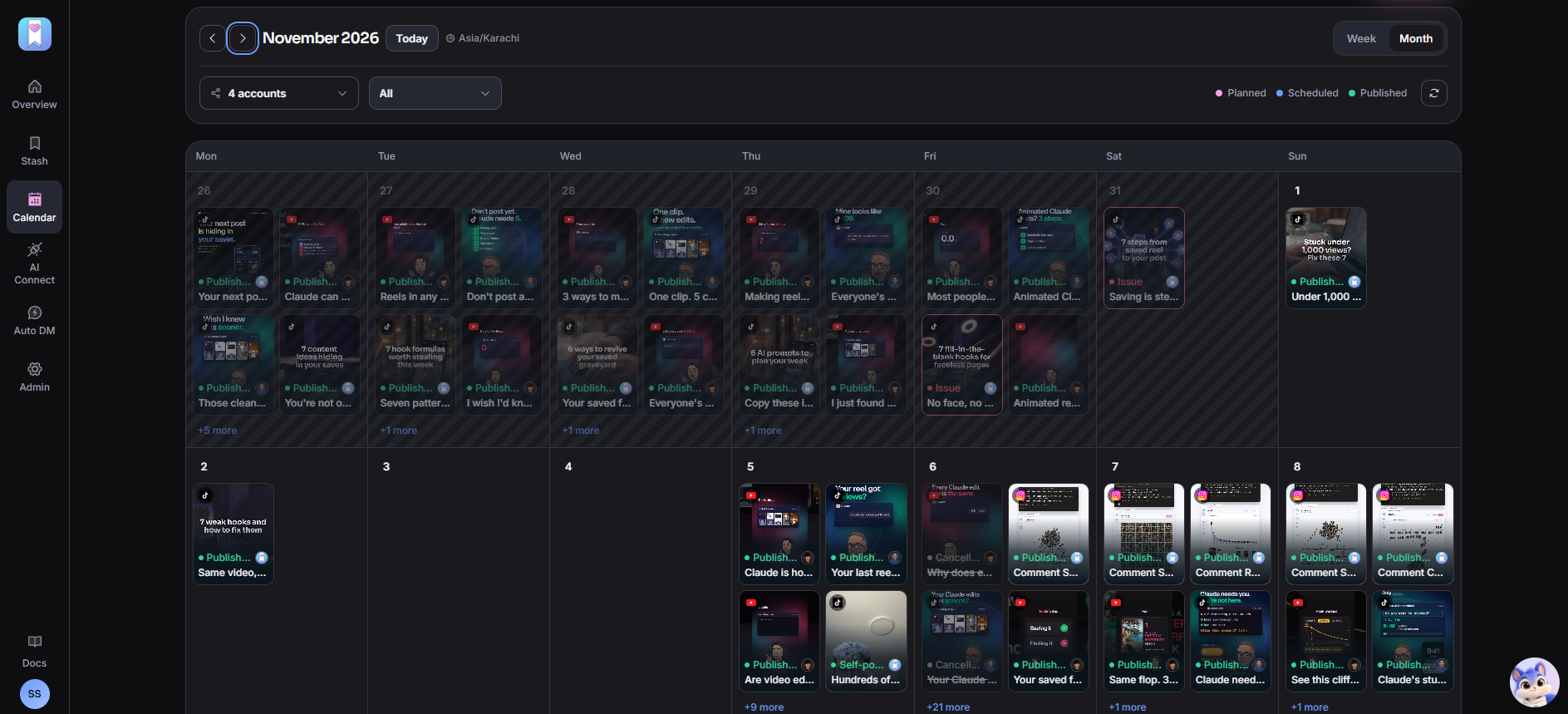
FavStash is a web calendar that publishes to Instagram, TikTok, YouTube, LinkedIn and X. You create and schedule on the web; the mobile app shows your calendar so you can check the week from your phone.
Step 1: Connect your accounts
Go to Portal → Schedule → Add channel, choose a platform, and approve the connection on that platform's own sign-in page, so FavStash never sees your password. Instagram has to be a Professional account (Creator or Business), which is free to switch to in Instagram's settings. TikTok connects with your normal login, and YouTube with whichever Google account owns the channel. Add as many accounts as you run (a main, an alt, a client) and they'll all sit on the same calendar.
Step 2: Schedule one post to all three
- Click an empty slot on the calendar at the day and time you want.
- Upload the video. One vertical file works as a Reel, a TikTok and a Short.
- Write the caption once. It's shared across channels and becomes the description on YouTube.
- Tick the accounts you want, then check each platform's tab (see the table).
- Hit Schedule. Anything from 2 minutes to 22 days out is fine.
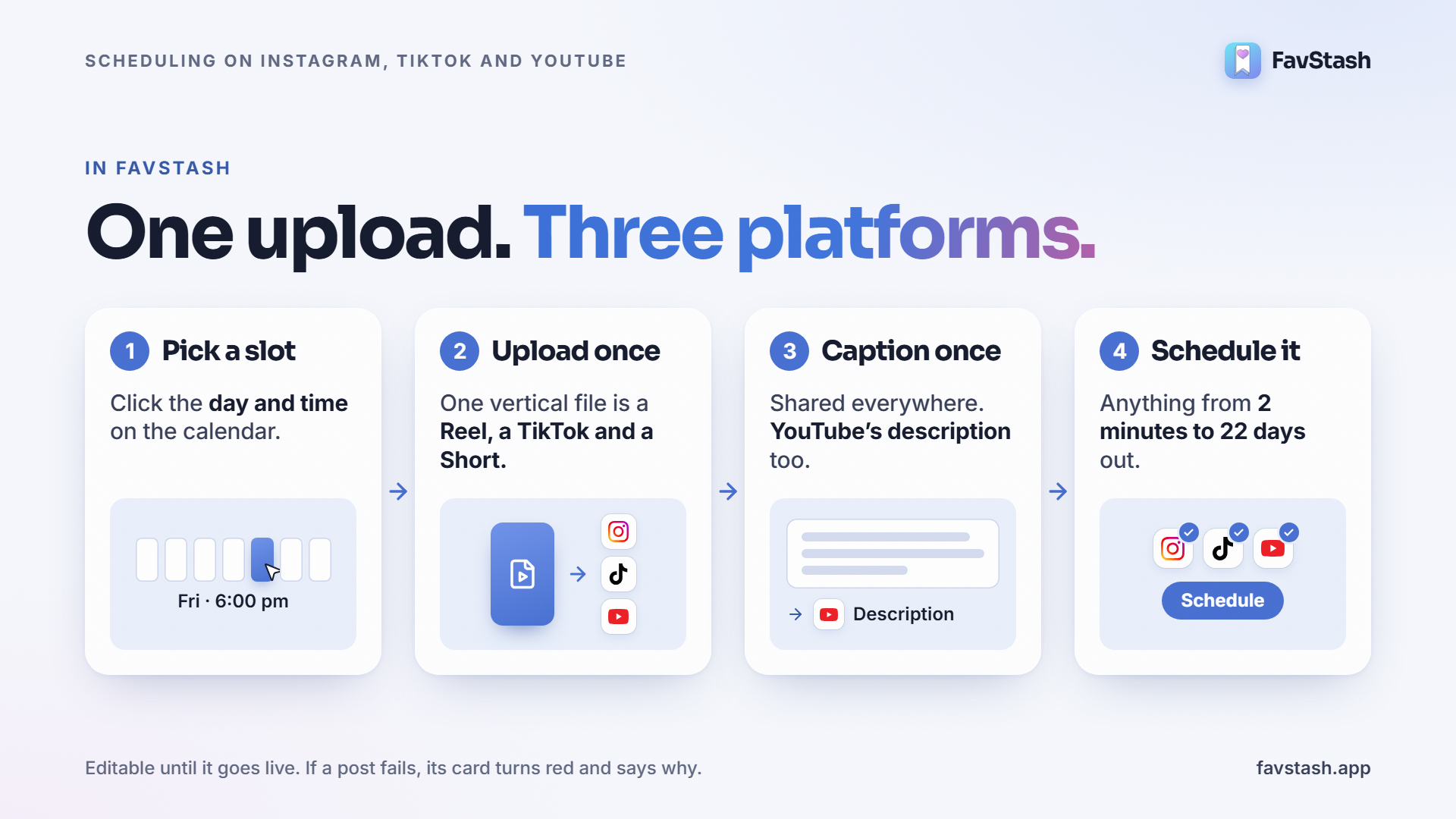
Until the post goes live you can still change the caption, media, settings or time. If it fails, the card on the calendar turns red and tells you what went wrong.
| Platform | What to set | Good to know |
|---|---|---|
| Post type: Post or Story. Optional Trial Reel | 1 video = Reel. 2 to 10 files = carousel. Stories auto-publish | |
| TikTok | Direct post or send to inbox. Privacy, duets, stitches, comments | JPEG or WebP for photo posts. Videos at 720p or higher |
| YouTube | Title (required), visibility, "made for kids" | Your caption becomes the description |
To test a Reel on non-followers first, switch it to a Trial Reel and graduate it manually later, or let Instagram share it if it performs. Here's how to post Trial Reels with the 3-hook method.
Watermarks and duplicate checks can quietly cut reach, so read what to change when cross-posting to TikTok and Shorts first. Platform-specific settings live on TikTok scheduling and YouTube Shorts scheduling.
Step 3: Run your week from the calendar
This is the part I'd pay for on its own, and none of the native apps have it. Week and month views show every Instagram, TikTok and YouTube post at its time, colour-coded as queued, draft, published or error. You click a card to edit or move it, or click an empty slot to fill a gap. Drafts can sit on a date without a time, and they won't publish until you actually schedule them.
A real example: of the first 100 posts our team queued from October 28, 81 went out on time (36 Reels, 24 TikToks, 21 Shorts) and we cancelled 16 ourselves. The other three were TikToks that failed, and each red card said why: a video under 720p, an image TikTok couldn't fetch, and an upload that never got confirmed. No hunting through three apps.
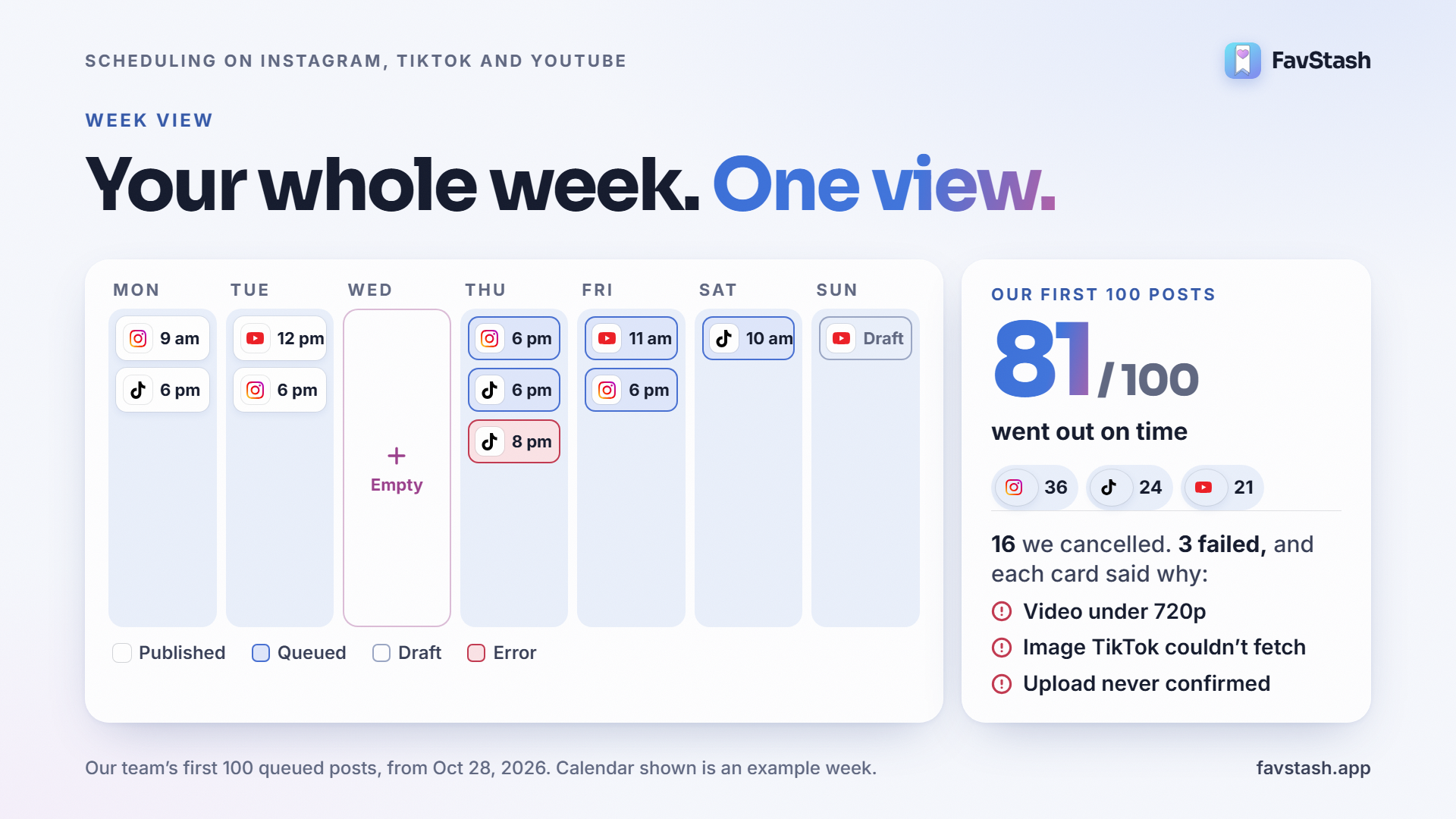
Pro tip: spend two minutes in month view every Monday. Look for the empty days first, then the days with two things going out at once.
Schedule it all from Claude or ChatGPT#
Once FavStash is connected to Claude or ChatGPT, the same chat that writes your captions can post them. Attach the video and ask for the whole thing at once:
"Schedule this video for Friday at 6 pm as a Reel on @mybrand, a TikTok and a YouTube Short, with a different caption for each. Then set up a comment-to-DM on the Reel: anyone who comments GUIDE gets this link."
Claude shows you the plan and asks before anything is published, unless you've told it not to. Setup takes a few minutes: connect FavStash to Claude, or add it to ChatGPT the same way.
See which post won on each platform#
The same video almost never does equally well everywhere, so it's worth checking where it actually landed.
| Platform | What you can track | What it tells you |
|---|---|---|
| Views, reach, skip rate, watch time, shares, saves | Skip rate grades your hook. Shares and saves show value | |
| TikTok | Views, likes, comments, shares | Which hooks travel on the For You feed |
| YouTube | Views, watch time, subscribers gained | Which Shorts turn viewers into subscribers |
FavStash social media analytics put all three side by side and compare this week with last. For a post-by-post ranking, ask Claude something like "rank my Reels, TikToks and Shorts from the last 30 days by watch time", then schedule more of whatever came out on top.
Decision rule: compare each platform with its own history. A Short on 4,000 views could be your best ever on one channel and a flop on another.
Turn comments into leads with comment-to-DM#
A Reel goes live at 6 p.m. and five minutes later there are a dozen comments asking for the guide. Reply at 9 the next morning and most of those people are gone. Comment-to-DM sends your link to anyone who comments your keyword, within moments:
- Pick the post. Any post or Reel on your account works, including ones you didn't publish with FavStash.
- Choose the keyword, or up to 10 of them, like GUIDE or LINK. "Contains" matching catches it mid-sentence.
- Turn on a public reply such as "Sent you a DM 📩", which nudges other people to comment too.
- Write the DM and a button label, like "Send me the link".
- Go live. The link arrives once they tap the button, which is how Instagram allows a business to send one.
Each person gets one DM however often they comment, and if a Reel takes off, DMs queue instead of getting dropped. In Claude, add the keyword in the same request that schedules the post; in the web app, add it once the post is live. The Instagram comment-to-DM page has the rest.
Pro tip: a lot of people comment an emoji instead of the word, as one Reddit user found. Put the keyword on screen as well as in the caption, and add a common misspelling as a second keyword.
One honest limit: this only works on Instagram. Neither TikTok nor YouTube Shorts has anything like it, so on those platforms you're still pointing people to a link in your profile or description.
How to schedule posts natively#
If you want to stay with the free built-in tools, here's the short version for each.
- Instagram: tap Create (+), pick your media, add the caption and music, then open More options and turn on Schedule this post. You can't schedule collab posts, product tags or fundraisers this way, and for Stories or scheduling from a laptop you'll need Meta Business Suite.
- TikTok: use the Upload page on a computer, or the TikTok Studio app on your phone. Add the video, switch on Schedule and pick a time. The feature has been around since 2021 for Creator and Business accounts.
- YouTube Shorts: upload the Short as a regular video in YouTube Studio (or tap + and Upload a video on your phone, not the Shorts camera), then choose Schedule under Visibility.
| What you need | Native apps | FavStash |
|---|---|---|
| Schedule all three platforms | Yes, in three different apps | Yes, from one composer |
| One calendar for every platform | No. Business Suite covers Facebook and Instagram only | Yes, week and month views |
| Several accounts in one post | No | Yes |
| Instagram Stories | Business Suite only | Yes, auto-published |
| From ChatGPT or Claude | No | Yes |
| Comment-to-DM | No | Yes, on Instagram |
| Cross-platform analytics | Each app separately | Side by side |
| How far ahead | Instagram 30 days, TikTok 10 days on desktop | 22 days |
| Instagram's music library | Yes | No. Add audio in your edit |
| Price | Free | Free for 1 channel and 4 posts a month |
FavStash publishes through Instagram's official Content Publishing API and each platform's own sign-in.
Where Instagram moved your scheduled posts#
Instagram's February 26, 2026 update moved the Scheduled content menu. It's now under Profile → ☰ → Account type and tools → Scheduled content. There's also a quicker route that a Reddit user spotted the same day: tap Create (+), then Scheduled, next to Drafts. From there you can edit, reschedule, share now or delete any post. As another commenter noted, Instagram didn't update its help pages when it moved it.
Why can't I schedule posts?#
| What you see | Likely cause | Try this |
|---|---|---|
| No "Schedule this post" on Instagram | It moved under More options in early 2026 | Open More options before you tap Share |
| No option at all on one Instagram account | A private or brand-new account. One user's 3-week-old account had none | Go public and update the app, or use a scheduler |
| Instagram post stuck on "Scheduled (in progress)" | A native bug reported for weeks | Post it by hand |
| No Schedule option in the TikTok app | It only exists on desktop and in TikTok Studio | Use a computer or TikTok Studio |
| TikTok Studio post never went out | Reported by users even inside the 10-day window | Check your TikTok drafts and inbox, then reschedule |
| A Short won't schedule | It was recorded with the Shorts camera | Upload it as a video instead |
| A red card in FavStash | Expired connection, platform rejection or bad media | Read the reason, fix it and requeue |
Do scheduled posts get less reach?#
Instagram's head, Adam Mosseri, has said more than once that scheduling won't affect reach "one way or the other" (Kontentino keeps a record of it). In his October 23, 2026 Q&A he was blunter:
"I schedule posts all the time." (Adam Mosseri, via ZoomSphere's roundup of his Q&As)
Plenty of creators don't buy it. One gets 25k to 75k views posting by hand and under 5k when they schedule. A TikTok creator running three accounts over 100k followers posted this week that scheduling "completely kills your reach". Others schedule everything and keep growing.
On Instagram, at least, I think much of the gap comes down to sound. Posts published through the API can't use Instagram's music library or in-app effects, so if your manual Reels ride a trending audio and your scheduled ones don't, you're comparing two different posts. A scheduler founder made the same point, with a disclosure.
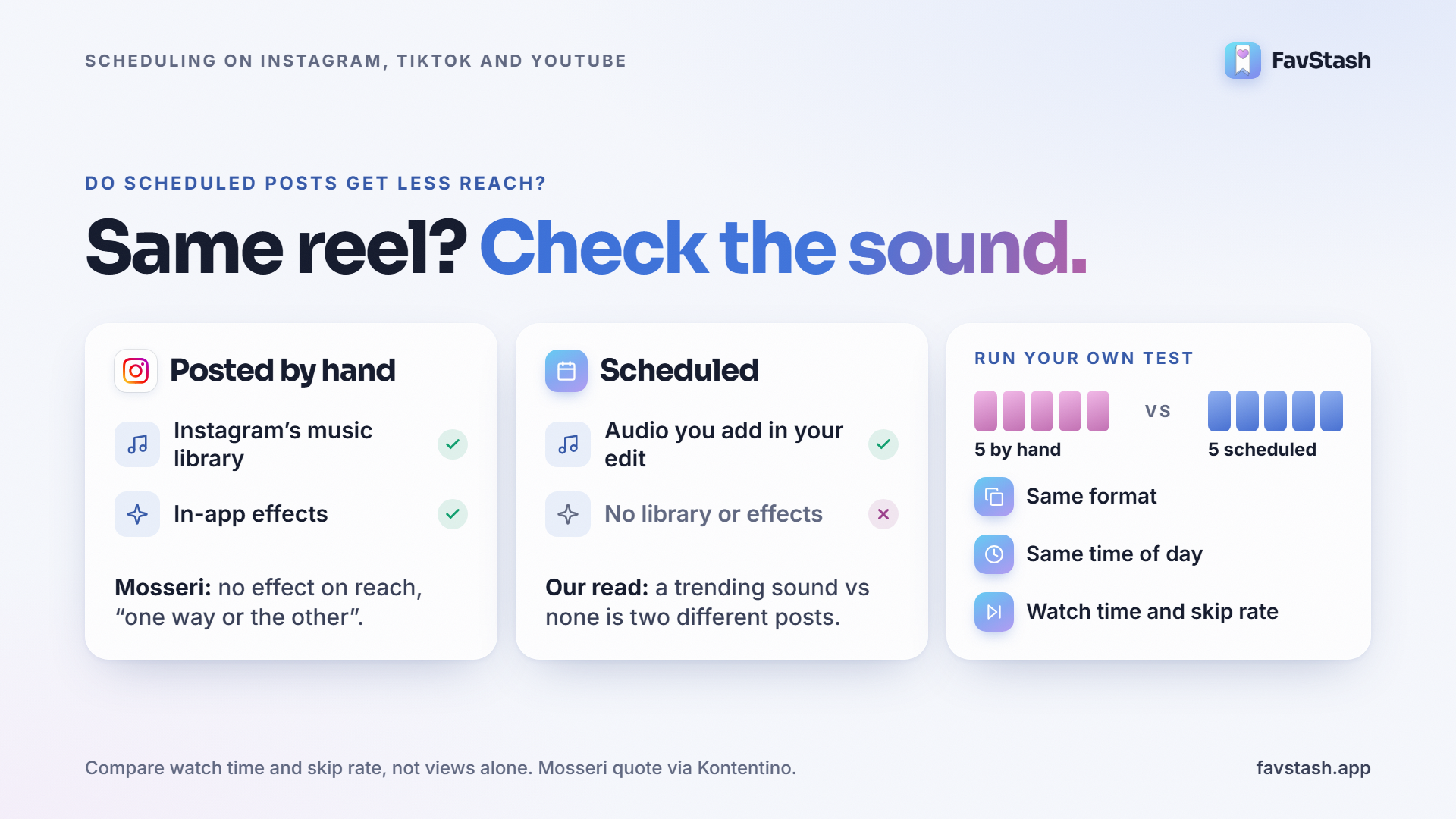
Decision rule: run your own test before you believe anyone, including me. Post five videos by hand and schedule five, same format, same time of day, and compare watch time and skip rate rather than views alone.
Author's take#
The tip I see most on Reddit is to keep posts in drafts and set a reminder to publish them yourself. I understand why, but across three platforms that's three reminders a day dragging you back to your phone. A Quora answer says doing it all by hand mostly led to burnout, and a shop owner on Reddit loses five hours every Saturday batching posts.
For me the calendar matters more than the scheduling. When every post is on one week view, you stop wondering whether you posted today and start noticing more useful things: the Tuesday with nothing on it, or that TikTok hasn't had anything new since the weekend.
My rule: once you post to two or more platforms, plan the week on one calendar. Schedule anything that doesn't depend on a trending sound, put a comment keyword on anything with a freebie, and spend the hour you get back actually replying to people.
Plan your next week in one sitting#
For a single post on a single app, the built-in schedulers are fine. Once you're running Instagram, TikTok and YouTube at the same time, you want the week on one calendar and the comments working for you overnight. FavStash is free to start with no card. If Instagram is your main channel, see how to schedule Reels, carousels and Stories straight from Claude.