How to Find Saved Reels on Instagram and Turn Them Into Your Next Post
Find saved reels on Instagram in 3 taps. Then search your Reels, TikToks and Shorts by what was said, even from Claude, and turn them into your next post.
Sam · · 14 min read
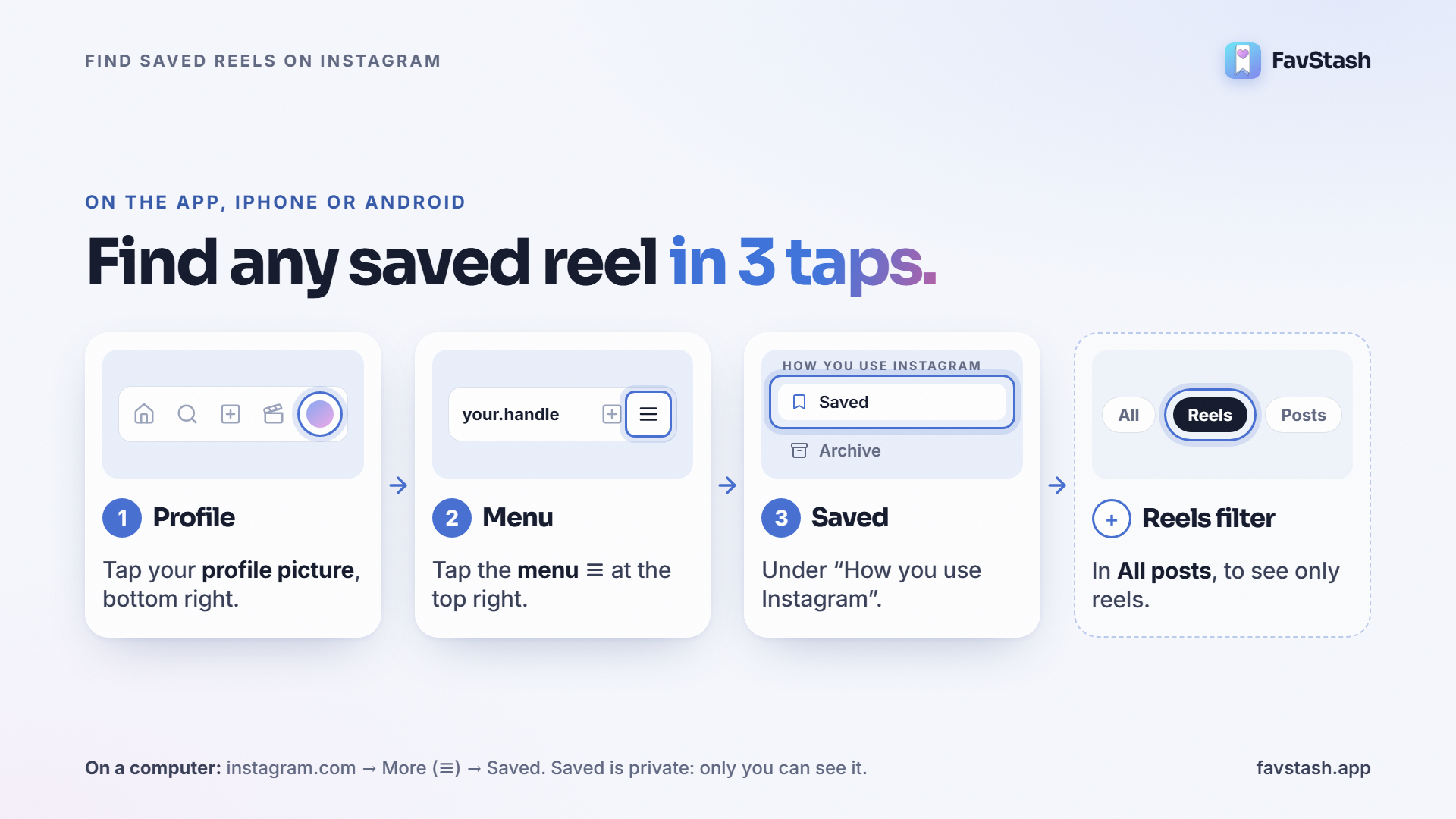
Where are my saved reels? Open Instagram, tap your profile picture, tap the menu (☰) at the top right, then tap Saved. Every reel, post and video you've saved sits there, newest first.
That's how to find saved reels on Instagram. It takes three taps.
The hard part comes later. You saved that reel for a reason: a hook to borrow, a format to try, an idea for your own post. Six months on, it's buried under 800 others. And your TikToks, Shorts and LinkedIn saves sit in four other folders.
That's how Saved becomes a graveyard. This guide shows how to find any reel today, then how to turn your saves into a garden: ideas you can search in seconds, from any app or straight from Claude, and grow into posts of your own.
The Instagram steps match Instagram's Help Center as of November 2026. I also read 20+ Reddit and Quora threads from people stuck with 1,000+ saves.
[Screen recording: Profile → ☰ → Saved → Reels filter, then the same reel found in FavStash by typing what was said, then asking Claude for it]
TL;DR#
- Find saved reels: Profile → ☰ → Saved → All posts. Tap the Reels filter to see only reels.
- On a computer: instagram.com → More (☰) → Saved.
- Saved isn't downloaded. Saves live inside Instagram, not in your phone's gallery.
- Didn't save it? Check Your activity → Likes (your 300 most recent) or Watch history (the last 30 days).
- Why Saved becomes a graveyard: no sort, no filters, no search by what was said, and a separate pile in every app.
- The garden: one stash for Reels, TikToks, Shorts, LinkedIn and X posts, searchable by what was said. Ask Claude or ChatGPT to dig through it for you.
- The payoff: turn a saved reel into content ideas, then into your own edit, scheduled and ready to collect leads.
How to find saved reels on Instagram#
On the app (iPhone or Android):
- Tap your profile picture at the bottom right.
- Tap the menu (☰) at the top right.
- Under "How you use Instagram", tap Saved.
- Tap All posts to see everything. Tap the Reels filter at the top to see only reels.
- Saved a reel into a collection? Open that collection instead.
Saved is private. Only you can see it, and creators aren't told when you save their post.
On desktop
- Go to instagram.com and log in.
- Click More (☰) at the bottom left.
- Click Saved.
You can also open your profile and click the Saved tab. A bigger screen makes long scrolls less painful, though thousands of saves still load slowly.
Saved posts and videos live in the same place
There's no separate folder for posts or videos. Your Instagram saved posts, videos and reels all sit together in Saved → All posts. So "how to find saved posts on Instagram" and "how to find saved videos on Instagram" have the same answer as reels.
Saved vs liked vs watched vs downloaded#
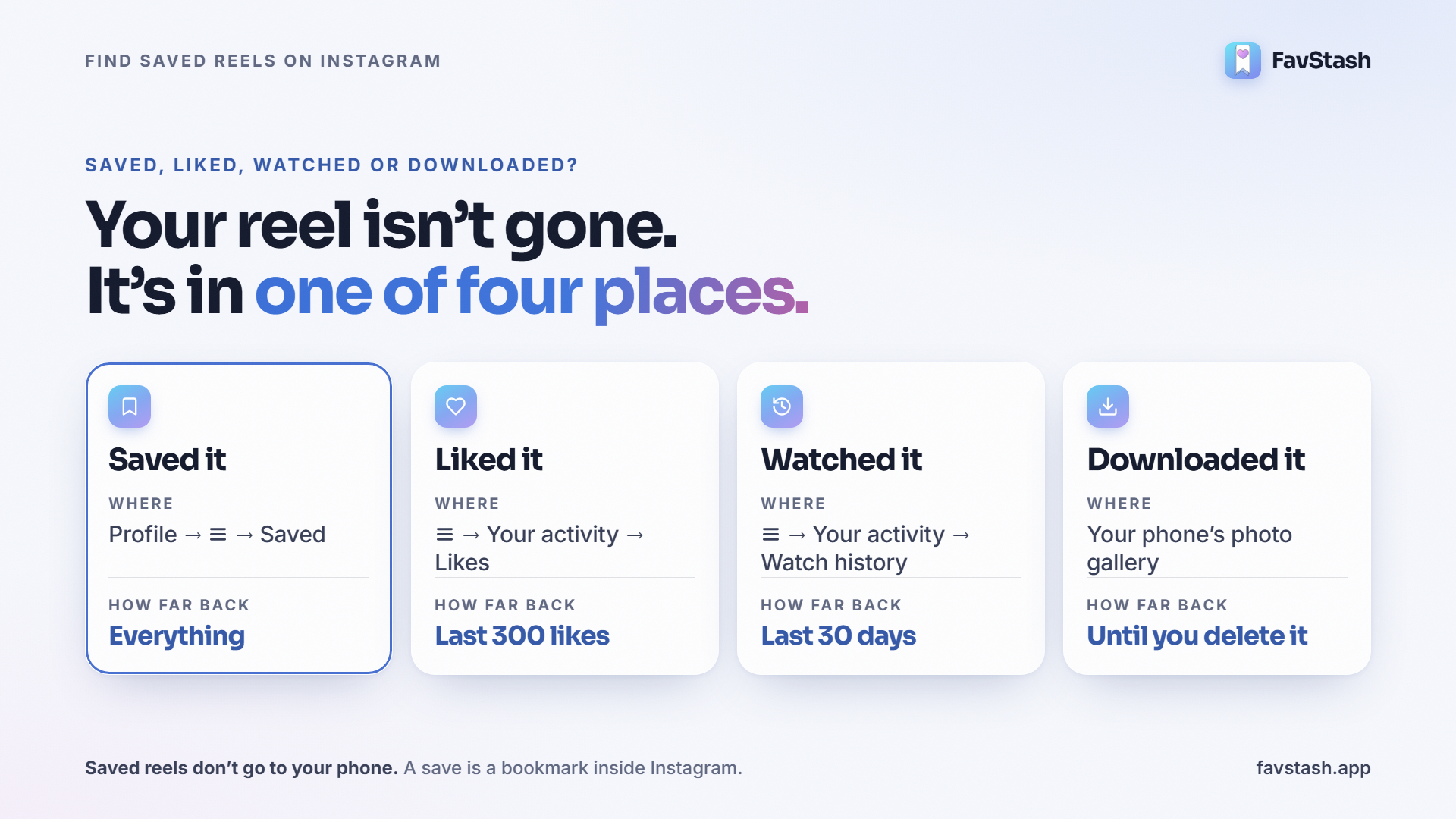
Most "my reel is gone" moments are a mix-up between these four.
| What you did | Where it lives | How far back |
|---|---|---|
| Saved it | Profile → ☰ → Saved | Everything you've saved |
| Liked it | ☰ → Your activity → Likes → filter to Reels | Your 300 most recent likes |
| Watched it | ☰ → Your activity → Watch history | The last 30 days of Reels, sortable by date and filterable by creator |
| Downloaded it | Your phone's photo gallery | Until you delete it |
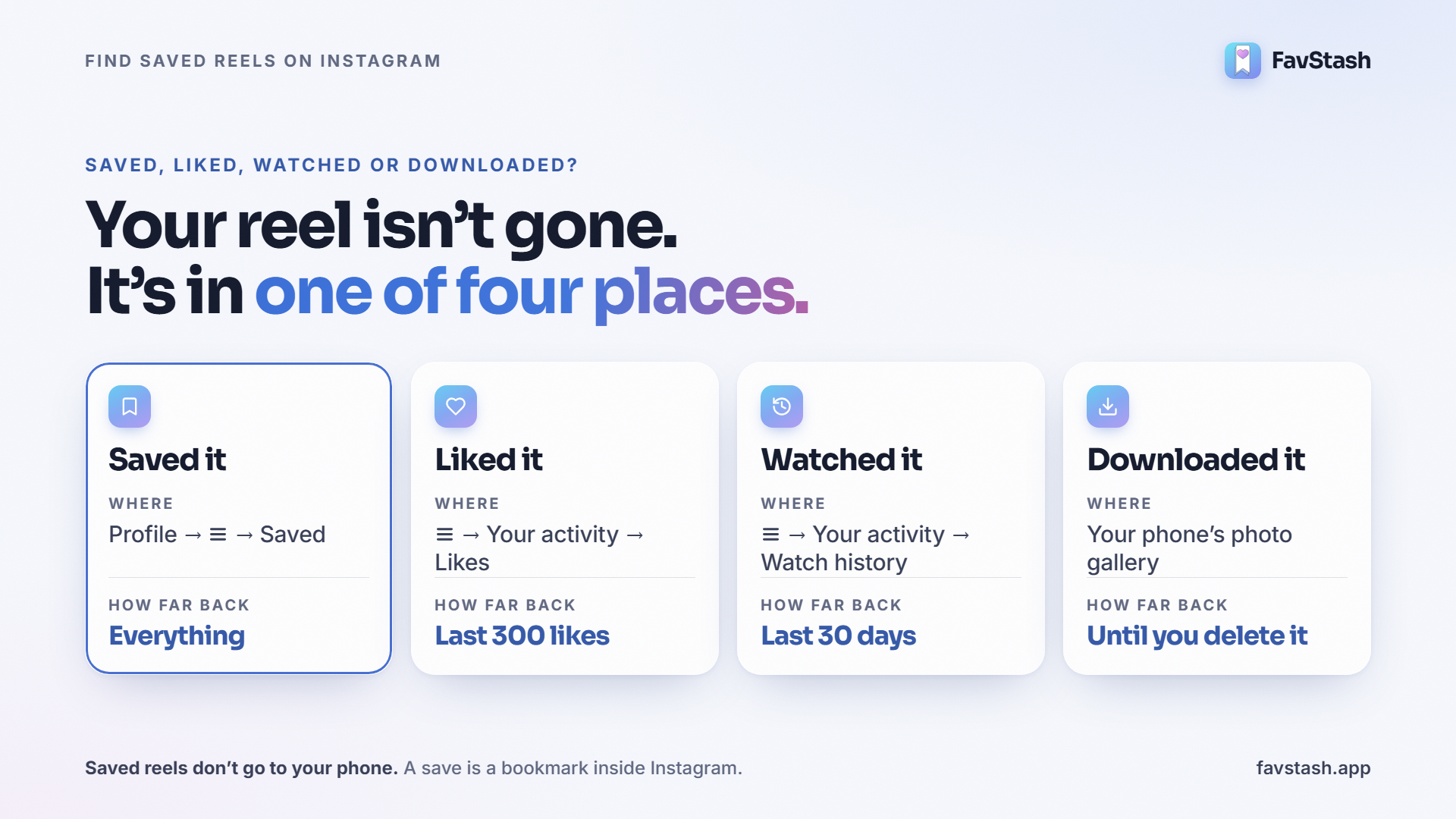
Saved reels don't go to your phone. A save is a bookmark inside Instagram. Nothing lands in your gallery. Searches like "saved reels on my phone" have grown fast this year, so this trips up a lot of people.
Decision rule: watched it in the last 30 days? Check Watch history first. Older than that, and you didn't like or save it? Search the creator's profile, then let it go.
Why your saved reels aren't showing#
| What you see | Likely cause | Try this |
|---|---|---|
| No Saved tab on your profile | Saved now sits inside the ☰ menu | Profile → ☰ → Saved. Update the app if it's missing |
| A big collection won't load, small ones do | An Instagram-side bug. Users reported this in August 2026, and it cleared within days | Update the app, try instagram.com, wait a day. Don't unsave anything |
| Scrolling stops at old saves, or the app crashes | Saved loads newest first, one screen at a time, with no way to jump back | Try desktop. Filter to Reels. File new saves into collections |
| One reel says it's unavailable | The creator removed it or made the account private | Nothing to fix on your side |
The long-scroll problem is real. Here's one user who tried to brute-force it:
"Just put my computer on automatic scroll for 30 minutes. The furthest I can access to is posts from february" (am_n00ne, r/Instagram)
Another in the same thread scrolled for 40 minutes before the app crashed.
Can you search saved reels on Instagram?#
Not well, and not by what was said. That's why Saved turns into a graveyard.
- No sort. Saved shows newest first. You can't flip it to oldest first.
- No filters. There's no filter by year, creator or topic.
- No search in the collection picker. People with many collections scroll a long list on every save. Some make duplicate collections because they can't find the old one.
A search box may be coming. Since October 2026, some users report a search bar inside Saved. Meta hasn't announced it or said what it searches. Open Saved and look at the top. If it's there, try it.
Even then, it only covers Instagram. And most people who save reels for ideas save everywhere:
| App | Where your saves live |
|---|---|
| Profile → ☰ → Saved | |
| TikTok | Profile → bookmark tab (Favorites) |
| YouTube Shorts | Save to a playlist or Watch later, then You → Playlists |
| My items → Saved posts and articles | |
| X | Bookmarks, in the side menu |
Five apps, five piles. One user on r/productivity saves across Instagram and TikTok: hairstyles, restaurants, work references. Their one big "inbox" collection "has now become a black hole."
How to organize saved reels: 5 ways, ranked#
Collections work at first. One r/productivity user puts the breaking point at about 100 saves. Here's how the common systems compare.
| Method | Best for | Breaks when | My verdict |
|---|---|---|---|
| 1. Instagram collections | Under ~100 saves, Instagram only | You can't search collection names, and nothing searches inside a reel | Fine to start |
| 2. DM reels to yourself | Fast capture, sharing with a partner | It's a chat log. Newest first, no categories | An inbox, not an archive |
| 3. Screenshot + a notes app | Remembering why you saved it | You lose the audio, and your camera roll fills up | Good for your top 10 |
| 4. A Notion or Airtable log | Creators who script every week | You skip the 30 seconds per save | Best manual system |
| 5. One stash that reads every video | Hundreds of saves across apps | You save five things a month | My pick |
To set up method 1, long-press the bookmark icon when you save, then pick or create a collection. Instagram's collections guide covers renaming and covers.
Method 4 has the best advice I found on Reddit. Log each save with three fields: hook, format and why it worked. Then:
"review that list during scripting, not while scrolling, or it stays a graveyard of good intentions." (Upset-Animal1376, r/contentcreation)
The catch is the 30 seconds per save. Skip it for a week and the log goes stale. Method 5 does that logging for you.
Decision rule: under 100 saves and Instagram only? Use collections. Hundreds of saves, or saves across TikTok, Shorts and LinkedIn too? Use a stash that reads the video for you.
From graveyard to garden: one stash for every app#
Here's the problem in one line. You remember what someone said. Instagram only knows the caption.
FavStash lets you search your saves by what was said, whichever app you saved from. It reads each video when you save it.
- Install FavStash on iPhone or Android and sign in.
- Share to FavStash from any app. Tap Share on a Reel, TikTok, YouTube Short, LinkedIn post or X post, then pick FavStash. It's the same tap you use to send a reel to a friend.
- Let it read the video. FavStash pulls the transcript, the hook (the opening line), on-screen text and the format.
- Search in plain words. Type what you remember. Filter by platform, collection, tag or date if you want.
Here's a real search. I typed this into our team's stash (64 saves, mostly reels):
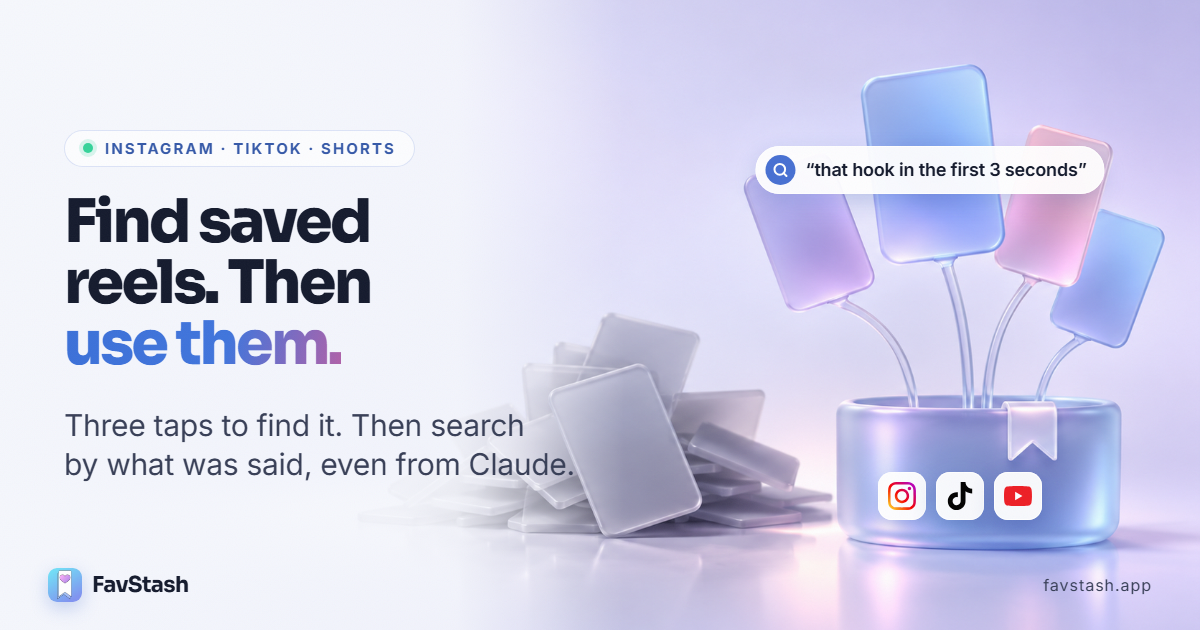
"that reel where someone explains how to write a hook in the first 3 seconds"
The top result was a Kallaway Marketing reel on "desire hooks", saved two months earlier. The words "3 seconds" aren't in its caption or its transcript. FavStash matched it on meaning, from what's said in the video.
Here's what changes when your saves live in one place:
| Your saves today | Instagram Saved | A FavStash stash |
|---|---|---|
| Where they live | Instagram only. TikTok, Shorts and LinkedIn are separate | Reels, TikToks, Shorts, LinkedIn and X posts together |
| How you find one | Scroll, newest first | Type what you remember. It searches what was said |
| What you keep | A bookmark | Transcript, hook, on-screen text, format, your note |
| Who can search it | You, in the app | You in the app, or Claude and ChatGPT for you |
| What happens next | Nothing | It feeds your next script, edit and post |
Pro tip: add a one-line note when you save, like "use for Friday's reel." Notes are searchable too, so future you knows why you saved it.
The free plan has unlimited saves and searches. Your first 100 saves get full transcript and hook extraction. The Stash docs cover collections, tags and filters.
Search your saved reels from Claude or ChatGPT#
This is the part that changes how often you use your saves. You don't have to open an app and scroll. You ask.
Connect once, then talk to your stash in plain words:
- In Claude, open Customize → Connectors, search "favstash" and sign in. (ChatGPT works too.)
- Try a safe first prompt: "Find three things I saved about hooks. Do not create any posts yet."
- Ask for what you need, when you need it.
I tried it on our stash with one line: "find hook ideas and formats I can reuse for my own reels." It came back in seconds with six saves, five Instagram reels and one TikTok:
| Saved from | Creator | What it teaches | Ends with |
|---|---|---|---|
| @kallawaymarketing | A script format: hook, lock-in, body, rehook, CTA | Comment "script" | |
| @kallawaymarketing | The "desire hook" (outcome + relatable character) | Comment "desire" | |
| @peter.visuals | Hook, promise, value, open loops, CTA | Comment "Info" | |
| @leadgenman | A reel research tool built in Claude Code | Comment "research" | |
| @jayantcreates.ai | Researched, programmatic videos with a Claude skill | Comment "SETUP" | |
| TikTok | @nocode.joshua | 10 Claude skills for marketing | No CTA |
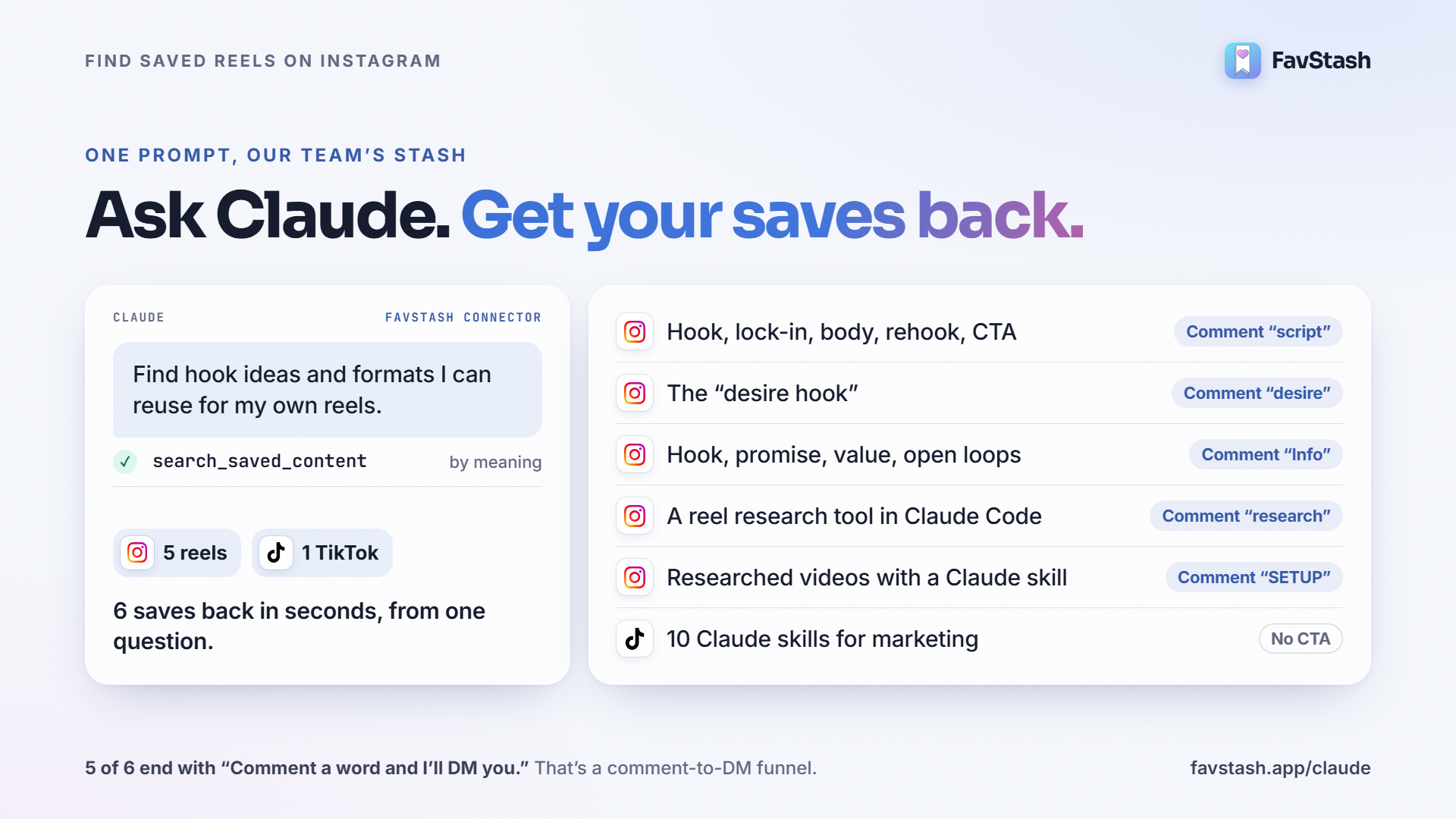
Two things stand out. The TikTok came back next to the reels, from one question. And five of the six end with "Comment a word and I'll DM you." More on that below.
Prompts worth stealing:
- "What have I saved in FavStash about hooks this month?"
- "Turn what I've saved into content ideas for next week."
- "Give me five reel ideas from the TikToks and reels I saved about pricing."
- "Pull my 5 best hooks from the stash and draft three openings for my next reel."
Claude asks before it publishes anything, unless you've pre-approved it. And FavStash doesn't use your saves to train any AI model. Setup details are on the Claude for social media page.
How to turn saved reels into your own content#
A saved reel is a seed. Here's how it grows into your next post.
- Pick a proven one. Look for a reel that beat its creator's usual views. FavStash's free skills call a reel "proven" at about 3x the creator's normal views.
- Break it down. Hook, format, structure and CTA. FavStash already pulled these when you saved it.
- Make it yours. Ask Claude to keep the structure and swap in your topic and voice. Three hooks on one body gives you three versions to test.
- Edit it. Turn a saved reel into your next edit with free Creator Skills for Claude Code or Codex. They cut your clips and add captions, sound and motion graphics on your computer. Here's how Claude edits videos in detail.
- Post it. Approve the final file, and it schedules to Instagram, TikTok, YouTube or LinkedIn.
- Collect the leads. Remember those "Comment a word" endings? That's a comment-to-DM funnel. Add a keyword to your own reel and send the DM automatically.
- Learn and replant. Compare how each version did. Save the winners back to your stash.
Here's step 3 in action. I gave Claude the desire-hook reel from our stash and asked for three openings for a post about saved reels:
- "Here's how to turn 800 saved reels into a month of posts."
- "Here's how to find any reel you saved, even the ones from last year."
- "Here's how to make your next reel from one that already worked."
Same pattern: lead with an outcome the viewer wants. New topic, your voice.
Decision rule: if a saved reel hasn't turned into a draft within two weeks, delete it or note why you're keeping it. Trend formats go stale fast.
Author's take#
Some people on Reddit say the answer is to stop saving. One commenter called it hoarding and said to delete the lot. Another gave up saving because sorting felt overwhelming.
I don't fully agree. Saving isn't the problem. Saving with no way back to it is.
A graveyard is a pile you never revisit. A garden is the same pile, but you can find any plant, you know why you planted it, and you pick from it every week. The saves don't change. Access does.
Here's the rule I'd use:
Save it only if you can finish this sentence: "I'll use this for ___." Put that in a note. Then make sure you can find it by what was said, from your phone or from Claude.
One Reddit tip I'd steal outright: a 10-minute triage every Sunday beats any clever system. And as another creator pointed out, trend formats go stale in a week or two. So the goal isn't a perfect library. It's a short gap between saving a reel and making one.
Turn your saved reels into a garden#
Instagram's Saved is fine for the last 20 things you saved. Past that, you need search. And search is only the start.
Save from the share sheet on Instagram, TikTok, YouTube, LinkedIn and X. Find any of it by the one line you remember, on your phone or from Claude. Then grow it into your next post. Start a free stash. No card needed.