Social Media Metrics Dashboard: Every Account's Performance in One View
See what a social media metrics dashboard shows across Instagram, TikTok and YouTube, what every metric means, and how to turn the numbers into better content.
https://www.linkedin.com/in/samm007 · · 13 min read
Checking how last week's posts did usually means three apps. Instagram Insights for Reels, TikTok Analytics for views, YouTube Studio for watch time. Each one has its own words and its own time window, so you end up with fragments instead of an answer to the only question that matters: what is working, and where?
A social media metrics dashboard puts those numbers on one screen. This guide walks through what FavStash's analytics dashboard shows for each account, explains every metric in plain English, and shows what we saw when we ran it on a live account on 16 October 2026: 17 connected channels, real numbers, and one pair of jokes that won on opposite platforms. FavStash is our product, so we also say plainly where it stops.
At a Glance#
| Question | Short answer |
|---|---|
| What does it do? | Shows views, likes, comments and more for every connected Instagram, TikTok and YouTube account on one screen |
| Which platforms? | Instagram, TikTok, YouTube. X on paid plans. No LinkedIn analytics |
| How fresh is it? | Instagram and YouTube refresh every six hours. TikTok and X update once a day |
| What does it cost? | Free: 1 channel, 7 days of history. $12.99 a month: 3 channels, 30 days. $29 a month: 10 channels, 90 days |
| Can I ask AI about it? | Yes. Claude and ChatGPT read the same data through the FavStash connector, on every plan |
| Not for | Ad reporting, competitor benchmarks, client-ready reports |
A social media metrics dashboard pulls performance numbers from your connected accounts into one screen, so you can compare views, likes, comments and watch time across platforms without opening each app. It answers one question: what is working, and where.
Key Points#
- One screen tracks views, likes and comments for every connected account, so you stop opening three apps to find out how a week went.
- The Measure menu switches the metric, the range selector sets the window (7, 30 or 90 days by plan), and the comparison table shows the latest 30 days against the previous 30.
- Platforms now count a view when playback starts, but raw views are still not like for like. Compare direction, and rank posts within each platform.
- On our live account the same two jokes won on opposite platforms. No single native app would have shown us that.
- The same data is open to Claude or ChatGPT, so you can ask questions instead of reading charts.
- It does not cover LinkedIn analytics, ads, competitors or client reports.
Who this is for#
- Creators and small teams on two or more platforms who post at least weekly and want one view of what is working.
- Skip it if you post on one platform now and then (your native app is enough), if you run paid ads, or if you manage many client accounts and need branded reports.
Walking through the dashboard#
Connect each account through its integration page: Instagram, TikTok and YouTube. The dashboard then builds from your recent history. The FavStash analytics page shows the full feature list. Here is what each part does and why you would open it.
The graph view
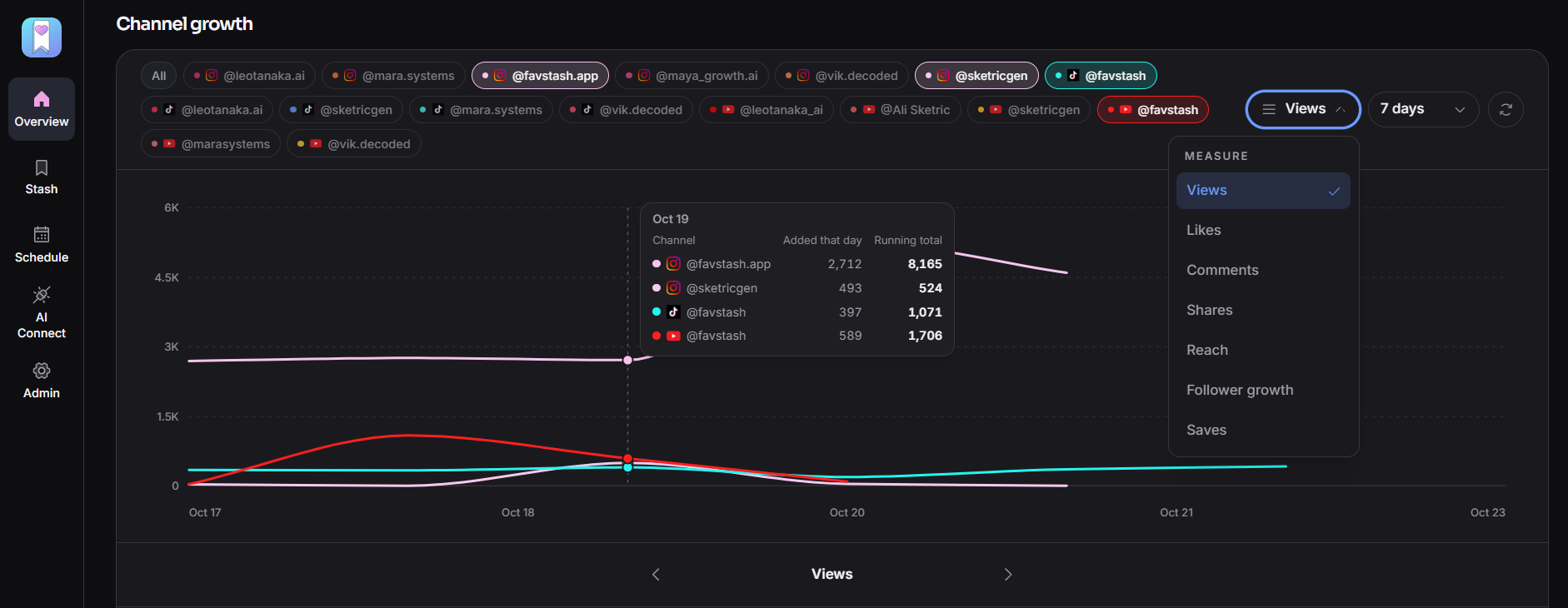
Pick one channel or the combined All view and you get a daily line per channel for the metric you chose. A spike or a dip shows up without opening dozens of posts. In our month the YouTube line sat nearly flat until 1 October, then jumped to 627 views in a single day. The line told us that in two seconds. The average would have hidden it.
The Measure menu
Under the graph, the Measure menu has seven options: Views, Likes, Comments, Shares, Reach, Follower growth and Saves. Same graph, different question. Views and Reach tell you how far a post travelled. Saves and Shares tell you whether it mattered to anyone. Platform-specific numbers such as YouTube watch time and average view duration are tracked as well, and your AI client can pull them on request.
The date range
The free plan shows 7 days, Doom Scroller 30 days and Creator Pro 90 days. Use the short window to judge a test post and the long one to see where a season is heading. Ninety is a sensible ceiling: Meta stores Instagram account-level metrics for up to 90 days, so history you do not capture is gone.
TikTok is the exception. Its API gives current totals and recent-video counters rather than a daily history, so FavStash builds TikTok history from daily snapshots. Connect it early if you want a longer TikTok trend later.
The channel comparison table
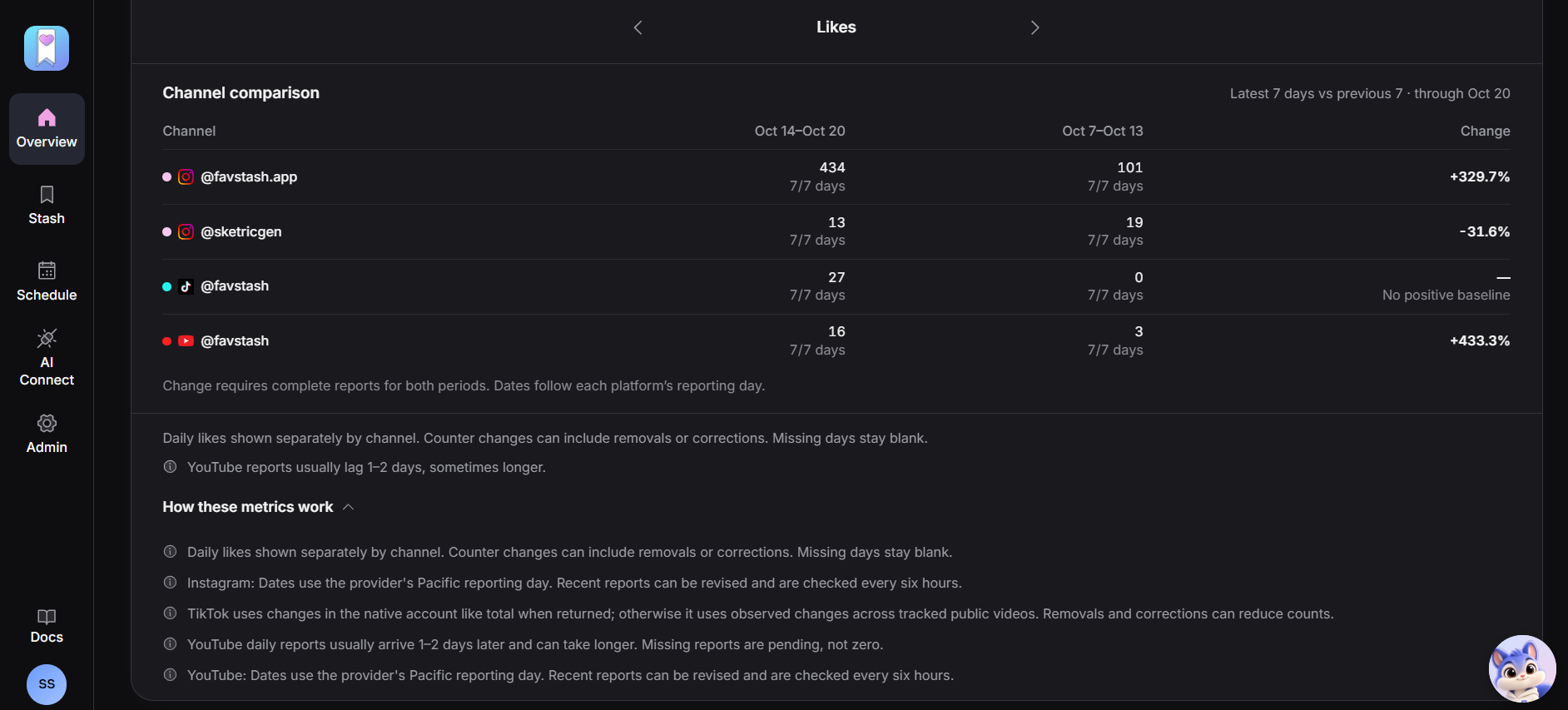
Below the graph, every connected channel gets a row with its latest 30 days against the previous 30 and the percentage change. This is the view that answers "where should I put my effort?" One account up while another is flat tells you where your content lands. Remember the TikTok caveat above: its row reflects recent videos and snapshots, not a true 30-day window.
Every metric, explained#
| Platform | Metric | What it tells you |
|---|---|---|
| Views | Times a Reel played (replays included) or a photo appeared on screen | |
| Reach | Unique accounts that saw it. One person watching five times is one reach | |
| Likes, comments | A quick tap, and written replies. Comments are the stronger signal | |
| Saves, shares | A bookmark ("worth coming back to") and a send to someone else (how content travels) | |
| Follower growth | Net new followers in the period | |
| Early skip rate, average watch time | Per Reel, through your AI client. Share of views skipped in the first 3 seconds, and average time watched | |
| YouTube | Views | Times a video started to play |
| YouTube | Watch time | Total minutes watched. The number that shows people stayed |
| YouTube | Average view duration and percentage | How long the typical viewer watched. Above 100% means many viewers looped it |
| YouTube | Subscribers gained and lost | Net change from your content |
| YouTube | Likes, comments, shares, added to playlists | Reactions and intent to return |
| TikTok | Views, likes, comments, shares | Counters for your 20 most recent videos, plus follower and video counts. No reach or saves |
| X (paid) | Followers, likes, replies, reposts, quotes, bookmarks, video views | Daily follower snapshots and engagement on your original posts |
The lists come from FavStash's analytics page and docs, checked on 16 October 2026. Do not track all of it. Pick two or three that match what you are trying to do: reach and follower growth to build an audience, comments and shares to build engagement, watch time and average view duration to test formats.
Views are closer than they used to be, but not the same#
Older guides say Instagram counts a view after one second, TikTok at the first frame and YouTube only after an algorithm check. That is out of date. Meta now defines Instagram Views as the number of times a Reel or video plays, replays included. YouTube counts a view from the first frame across formats from 24 August 2026 and reports engaged views separately. TikTok's advertiser help counts a view when a video starts to play.
So a view now roughly means "playback started" everywhere. That narrows the gap, but it does not close it. Replays, loops and autoplay are handled differently, and reach (unique people) answers a different question from views (plays). FavStash's own tool output carries the same warning: cross-platform views, reach and watch time are not directly equivalent, so compare rank within a platform or normalized rates. Ask "is Instagram growing faster than YouTube this month?", not "which platform has more views?"
What a real month looked like#
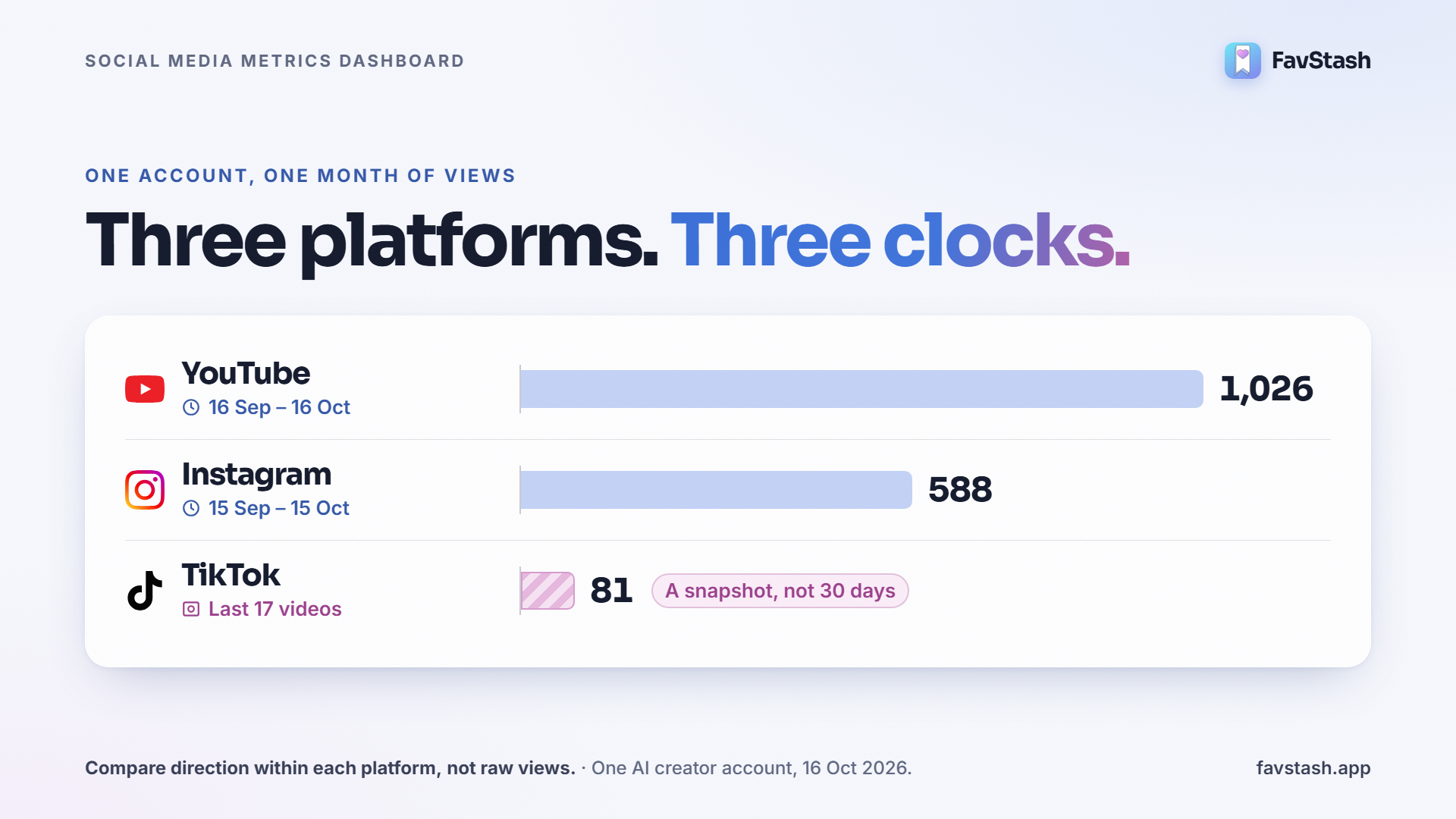
We pulled the numbers for one account through FavStash's analytics connector: Leo Tanaka's Instagram, TikTok and YouTube, an AI creator account run by the FavStash team (its captions say so). The windows differ slightly because each platform reports differently. The dashboard's TikTok overview also uses a separate daily collector, so its TikTok figures can differ a little from these.
| Platform | Window | Views | Likes | Comments | Shares | Also reported |
|---|---|---|---|---|---|---|
| 15 Sep to 15 Oct | 588 | 8 | 4 | 0 | Reach 454, saves 0 | |
| YouTube | 16 Sep to 16 Oct | 1,026 | 5 | 0 | 2 | 66 minutes watched, 10.2s average view duration, 1 subscriber gained |
| TikTok | Last 17 videos (snapshot) | 81 | 1 | 0 | 0 | No reach or saves available |
These are small numbers, and that is fine. The point is what they let us see. TikTok is a snapshot of recent videos, not 30 days, so it is not like for like. YouTube delivered the most views, but 627 of its 1,026 came on one day. Read the average and you would call it steady. Read the graph and you see one video carried the month.
Same jokes, opposite results
Two jokes ran on both Instagram and YouTube the same day, worded a little differently for each platform.
| Joke (published) | Instagram views (early skip rate) | YouTube views (average view percentage) |
|---|---|---|
| Dating joke about tool-call failures (29 Sep) | 328 (43.9%) | 17 (64.3%) |
| 3am startup dreams joke (1 Oct) | 48 (74.4%) | 635 (133%) |
Instagram picked the first joke. YouTube picked the second. A combined total would have told us nothing, and either native app alone would have told us half. With four data points we are not changing the calendar. We would test three more jokes of each kind on both platforms first.
From numbers to content decisions#
Three questions cover most of what a dashboard can tell you. Is it working at all (views, reach, trend)? Did people stay (early skip rate, watch time, average view duration)? Did it matter to them (saves, shares, comments)? These are rules of thumb, not FavStash features:
| What you see | What it often means | What to try |
|---|---|---|
| Views fine, watch time or skip rate poor | The opening promised something the video did not deliver | Rewrite the first seconds, or match the hook to what follows |
| Views low, saves and shares high | Right audience, weak packaging | Re-cut the opening and cover, then repost the idea |
| One spike, flat everywhere else | One post carried the period | Study that post. Do not plan around the average |
| Growing on one channel, flat on another | Your content fits one audience better | Shift effort to the growing channel and test a native format on the other |
| Likes steady, comments near zero | People tap but are not pulled in | Ask one specific question and check you have a call to action |
Our own Reels fit the first row. The three Instagram Reels that explained FavStash lost 88 to 90% of viewers early, while the two jokes lost 44% and 74%. We would rewrite the openings of the pitch Reels before making more of them.
Ask Claude or ChatGPT about your numbers#
FavStash connects to Claude and ChatGPT through MCP, and MCP access is included on every plan. Your AI client can read account totals, rank posts by a metric and compare accounts, including posts that were not published through FavStash. That is the practical version of AI social media analytics: the dashboard holds the numbers and the AI answers questions about them. You decide what to do.
- Cross-platform ranking. "Compare my top posts on Instagram, TikTok and YouTube for the last 30 days." We ran this. One call returned 15 ranked posts across three accounts, with a note that counts are not equivalent across platforms.
- Early retention. "Which of my Instagram Reels had the lowest early skip rate, and what do their openings have in common?"
- A metric the dashboard does not show. "Work out interactions per reach for my Instagram account this month." FavStash has no single engagement-rate number, but the AI can compute one. From our totals, (8 likes + 4 comments + 0 shares + 0 saves) / 454 reach = 2.6%. We did that division by hand, so define your own formula and keep it the same every month.
- Next steps. "Turn my top three hooks into next week's posts."
Refresh timing matters here. Instagram and YouTube reconcile every six hours and TikTok once a day, so ask about last week, not the last hour.
What practitioners are saying#
Three threads from the last year show the same gaps. Several replies in them come from people selling tools, which we note where it matters.
- Merging by hand is the pain. On r/socialmedia, someone asked how to pull post-level data from Instagram, TikTok and LinkedIn into Excel. Replies offered per-platform exports or n8n and scraping tools, and the asker found the per-post route tedious work.
- Early retention gets the blame. An r/InstagramMarketing creator compared two Reels: a 24% skip rate reached 36k views, while a 37% skip rate reached 2.8k despite a higher save rate. One commenter called early skip rate the gatekeeper for reach, and a commenter in a related thread said your niche changes what a good number is. This is self-reported, not Meta guidance.
- History is the gap. On r/ContentCreators, a commenter who sells a competing dashboard argued that most tools fall short on how far back they can see. That matches the 90-day Meta limit and the TikTok snapshot approach above.
Author's take#
If I could get every creator to stop watching one number, it would be follower count. A follower who never watches is worth little, and a non-follower who watches and shares is worth a lot.
My short list is three metrics. One for "did they stay" (early skip rate or average view duration), one for "did it matter" (saves or shares), and one for direction (the comparison table's percentage change). Check them weekly, not daily, because a bad Tuesday is not a strategy problem. If you are on one platform and post twice a week, your native app is fine. Move to a single dashboard when you are on two or more and tired of piecing the answer together.
What the dashboard cannot do#
- No LinkedIn analytics. FavStash cites API restrictions for personal profiles.
- No ads reporting. It tracks organic content only.
- No competitor benchmarks, comment or sentiment analysis, or link click tracking.
- No client-facing exportable reports. If you manage many client accounts, Metricool offers white-label client reports.
- TikTok and X history starts when you connect, because it builds from daily snapshots.
- YouTube figures are YouTube's totals, not the full Studio report, and retention curves cover only videos published through FavStash.
- Small Instagram accounts lose some metrics. Meta does not return certain insights for accounts under 100 followers.
Ready to see your own numbers?#
Connect one account and look at your last 7 days first. When you are ready, see the analytics dashboard on the free plan, no credit card required.
FAQs
- #social-media-analytics
- #social-media-metrics
- #instagram analytics
- #tiktok analytics